
We put a real app on Kubernetes in AWS. Here is every step, explained simply.
This is the first of three posts. By the end of this one you will have a React and Laravel application running on Amazon EKS, talking to a managed database and a real message queue, reachable from the internet.
Every command here was actually run. Every screenshot is the real thing. Nothing is reconstructed.
First, the whole idea in plain words
Imagine you have written a story and want people everywhere to read it.
- You need printed copies — that is Docker. It packs your app into a sealed box that behaves the same everywhere.
- You need a warehouse for the boxes — that is ECR, Amazon’s private storage.
- You need shelves in a shop where copies get unpacked and read — that is Kubernetes. It takes boxes out of the warehouse and runs them on computers.
- You need a doorman at the front so visitors reach the right shelf — that is the load balancer.
- You need a filing cabinet that remembers things after closing time — that is the database.
- You need a ticket spike for jobs to do later, so customers do not wait at the counter — that is the queue.
Everything below is those six ideas, spelled out properly.
What we are deploying
A small app chosen because it exercises every layer:
- Frontend — React 19 + TypeScript, built with Vite, served by nginx
- Backend — Laravel 13 on PHP 8.4, nginx and php-fpm in one container
- Worker — the same backend image running a queue consumer
- Database — MySQL 8 on RDS
- Queue — Amazon SQS
- Cache — Redis
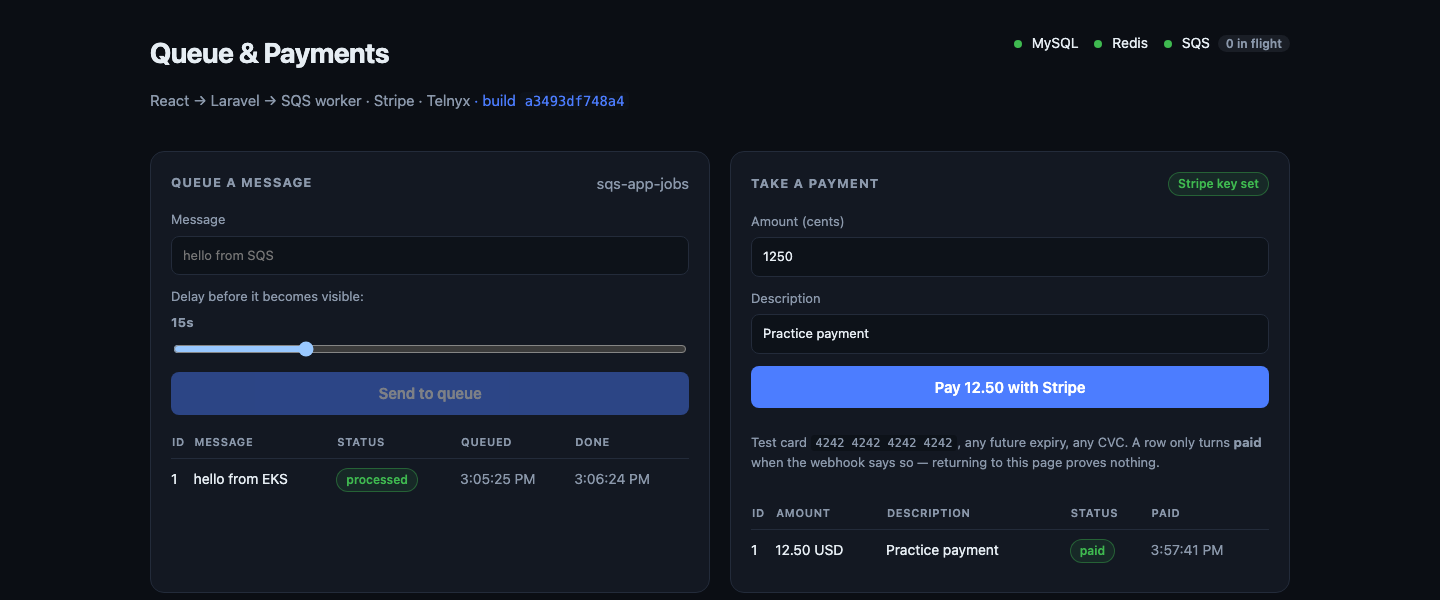
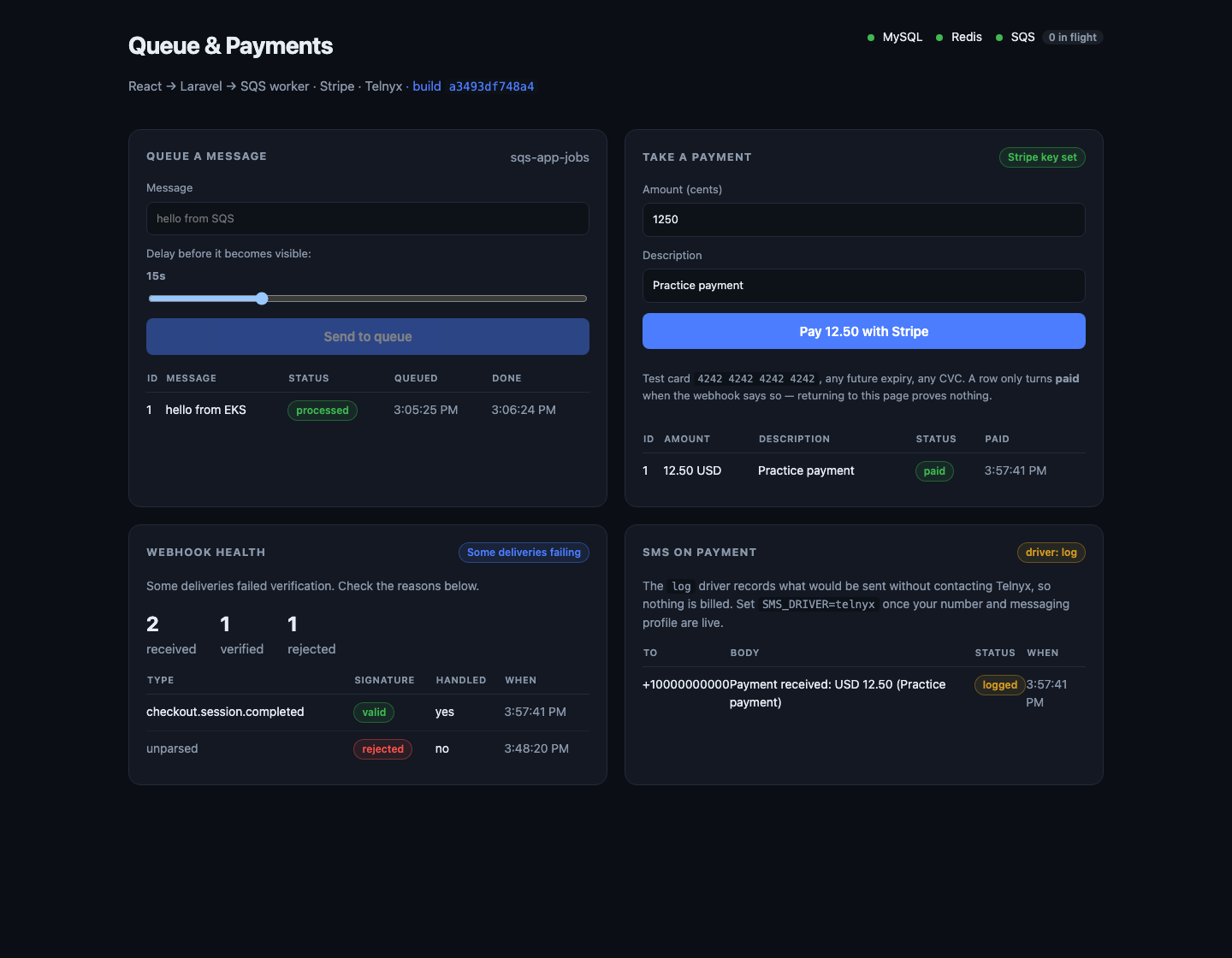
You type a message, it goes on the queue, and a separate program picks it up later. The page shows that happening — the row says waiting in SQS, then flips to processed. That is the whole point: making the invisible visible.
How a request actually travels
                        your browser
                             │  1. DNS: which IP is this load balancer?
                             ▼
                    ┌────────────────────┐
                    │  Load balancer     │  2. the only public thing
                    └─────────┬──────────┘
                              │  3. forwards to a healthy pod
                    ┌─────────▼──────────┐
                    │  frontend pod ×2   │  nginx serves the React bundle
                    └─────────┬──────────┘
                              │  4. anything /api/ is proxied onward
                    ┌─────────▼──────────┐
                    │  backend pod ×2    │  Laravel
                    └────┬──────────┬────┘
                         │          │
                 ┌───────▼───┐  ┌───▼──────────┐  ┌────────────┐
                 │ redis pod │  │ RDS MySQL    │  │ Amazon SQS │
                 └───────────┘  │ private only │  └─────┬──────┘
                                └──────────────┘        │
                                              ┌─────────▼────────┐
                                              │  worker pod      │
                                              └──────────────────┘
Only the load balancer is on the public internet. Not the pods, not the database.
Why the frontend proxies /api. The React bundle is just files. When its JavaScript calls the API, it calls the same hostname the user is already on, and nginx inside the frontend pod forwards anything starting with /api/ to the backend. Two problems vanish: there is no cross-origin request to configure, and no API address is baked into the JavaScript — it is supplied at container start, so one image runs on a laptop and in the cloud unchanged.
The words you will meet
| Thing | What it really is |
|---|---|
| Image | a sealed box containing your app and everything it needs |
| ECR | Amazon’s private warehouse for those boxes |
| EKS | Kubernetes, operated by Amazon |
| Control plane | Kubernetes’ brain. Amazon runs it; you pay hourly |
| Node | an ordinary virtual machine that runs your containers |
| Pod | one running copy of your app |
| Deployment | “keep 2 copies alive, and roll out new versions safely” |
| Service | a stable name for a group of pods |
| Ingress | “give me a load balancer, pointed at this Service” |
| ConfigMap | non-secret settings, injected as environment variables |
| Secret | the same, for passwords |
| Job | run this once until it succeeds, then stop |
| IRSA | lets a pod borrow AWS permissions with no stored key |
—
Stage 1 — The warehouse
EKS nodes cannot pull images from your laptop. They have to live somewhere the cluster can reach.
for repo in sqs-app-frontend sqs-app-backend; do
  aws ecr create-repository --repository-name "$repo" \
    --region us-east-1 --image-scanning-configuration scanOnPush=true
done

aws ecr get-login-password --region us-east-1 \
  | docker login --username AWS --password-stdin "$ECR_REGISTRY"
Build for the right processor. Apple Silicon Macs are arm64; EKS nodes are x86_64. Without the flag, pods start and instantly die with exec format error, which looks like a corrupt image and is not:
docker build --platform linux/amd64 -t "$ECR_REGISTRY/sqs-app-backend:latest" ./www/backend
docker push "$ECR_REGISTRY/sqs-app-backend:latest"
Why this stage is first: if the image is broken, better to find out now than during a rollout.
Stage 2 — The queue
One command, and it outlives everything else:
aws sqs create-queue --queue-name sqs-app-jobs --region us-east-1 \
  --attributes VisibilityTimeout=60,MessageRetentionPeriod=86400
VisibilityTimeout=60 — when a worker takes a message, SQS hides it from everyone else for 60 seconds. If that worker dies mid-job, the message reappears and someone else takes it. That is how “at least once” delivery works.
It must be at least as long as the worker’s timeout, or SQS will hand the same message to a second worker while the first still has it, and the job runs twice with nothing reporting an error.
SQS is not inside your network — it is a regional AWS service. So it survives every teardown, and under a million requests a month it is free.
Stage 3 — The cluster
This is the expensive one, and the one command that does the most.
# deploy/cluster.yaml
apiVersion: eksctl.io/v1alpha5
kind: ClusterConfig

metadata:
  name: sqs-app-cluster
  region: us-east-1
  version: "1.36"

# Required for IRSA -- how pods get AWS permissions with no stored keys.
iam:
  withOIDC: true

vpc:
  nat:
    gateway: Disable

managedNodeGroups:
  - name: ng-spot
    instanceTypes: ["t3.medium", "t3a.medium", "t2.medium"]
    spot: true
    desiredCapacity: 2
    minSize: 2
    maxSize: 4
    volumeSize: 20
    privateNetworking: false
eksctl create cluster -f deploy/cluster.yaml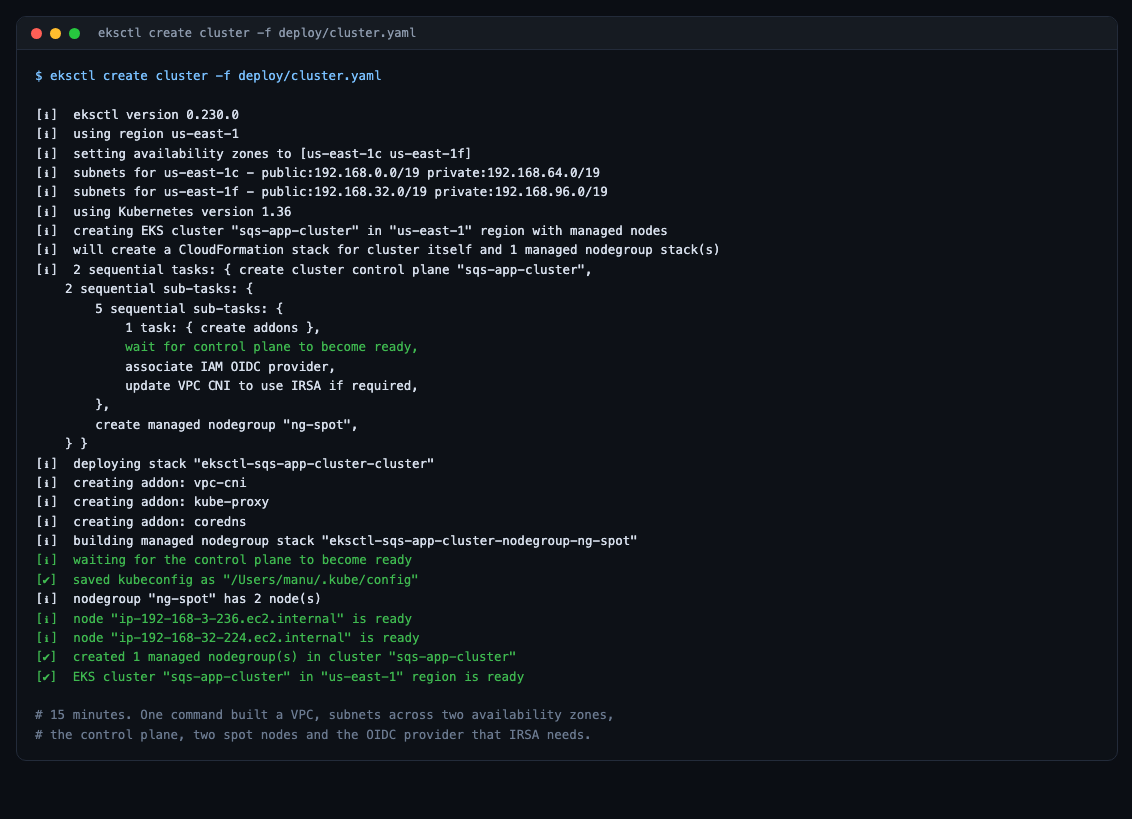
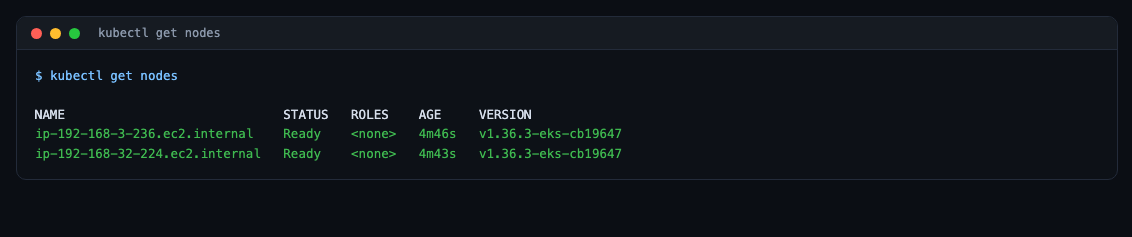
Check the version before you spend anything
Every EKS Kubernetes version gets about 14 months of standard support, then rolls into extended support automatically. Nothing breaks. But the control plane goes from $0.10/hour to $0.60/hour — six times more, on a separate invoice line, invisible in every console and CLI output.
aws eks describe-cluster-versions --region us-east-1 \
  --query 'clusterVersions[].[clusterVersion,versionStatus]' --output table
Pick the newest row saying STANDARD_SUPPORT. This is the single most expensive mistake available in this whole process, and the only signal is the bill.
Two settings that are cost choices, not best practice
nat.gateway: Disable with privateNetworking: false saves about $32 a month. The cost is that worker nodes sit directly on the internet with security groups as the only barrier. Fine for a lab you delete; not fine for real data.
spot: true is 60–90% cheaper. Interruptions are a feature when learning — you get to watch Kubernetes reschedule pods onto surviving nodes.
Stage 4 — The database
It must be in the same network as the cluster, in the private subnets, behind a firewall that only accepts the cluster.
VPC_ID=$(aws eks describe-cluster --name sqs-app-cluster --region us-east-1 \
  --query 'cluster.resourcesVpcConfig.vpcId' --output text)

CLUSTER_SG=$(aws eks describe-cluster --name sqs-app-cluster --region us-east-1 \
  --query 'cluster.resourcesVpcConfig.clusterSecurityGroupId' --output text)

# An ARRAY, not a string: --output text is tab-separated, and zsh does not
# word-split, so a bare variable becomes one argument containing a tab --
# which RDS rejects as "input can't contain control characters".
PRIVATE_SUBNETS=($(aws ec2 describe-subnets --region us-east-1 \
  --filters "Name=vpc-id,Values=$VPC_ID" \
            "Name=tag:kubernetes.io/role/internal-elb,Values=1" \
  --query 'Subnets[].SubnetId' --output text))

aws rds create-db-subnet-group \
  --db-subnet-group-name sqs-app-db-subnets \
  --db-subnet-group-description "private subnets" \
  --subnet-ids "${PRIVATE_SUBNETS[@]}" --region us-east-1

RDS_SG=$(aws ec2 create-security-group --group-name sqs-app-rds-sg \
  --description "MySQL from the cluster only" \
  --vpc-id "$VPC_ID" --region us-east-1 --query GroupId --output text)

aws ec2 authorize-security-group-ingress --group-id "$RDS_SG" \
  --protocol tcp --port 3306 --source-group "$CLUSTER_SG" --region us-east-1
That last rule is the interesting one. The source is a security group, not an IP range. Pod addresses change constantly; the security group does not. Anything in the cluster is allowed; nothing else is, no matter how the network is rearranged later.
aws rds create-db-instance \
  --db-instance-identifier sqs-app-mysql --db-instance-class db.t4g.micro \
  --engine mysql --engine-version 8.0 \
  --allocated-storage 20 --storage-type gp3 \
  --master-username sqs_app --master-user-password "$RDS_PASSWORD" \
  --db-name sqs_app --db-subnet-group-name sqs-app-db-subnets \
  --vpc-security-group-ids "$RDS_SG" \
  --no-publicly-accessible --backup-retention-period 1 --no-multi-az \
  --region us-east-1
--no-publicly-accessible matters most: no public address at all, so the database is unreachable from the internet regardless of firewall rules.
Stage 5 — Permissions without keys
Two things need AWS permissions: the load balancer controller, and your pods (for the queue).
The obvious way is an access key in a Secret. That key is long-lived, works from anywhere on earth, and if it leaks you may not notice for months.
IRSA removes the key entirely:
- The cluster has an OIDC identity provider — that is
withOIDC: true. - Kubernetes gives each pod a short-lived signed token saying “I am the service account
sqs-appin namespacesqs-app.” - An IAM role trusts exactly that sentence.
- The AWS SDK swaps the token for credentials that expire in an hour.
{
  "Version": "2012-10-17",
  "Statement": [{
    "Sid": "ProduceAndConsume",
    "Effect": "Allow",
    "Action": [
      "sqs:SendMessage", "sqs:ReceiveMessage", "sqs:DeleteMessage",
      "sqs:GetQueueAttributes", "sqs:GetQueueUrl", "sqs:ChangeMessageVisibility"
    ],
    "Resource": "arn:aws:sqs:REGION:ACCOUNT_ID:QUEUE_NAME"
  }]
}
One specific queue, not *.
aws iam create-policy --policy-name SqsAppQueueAccess \
  --policy-document file:///tmp/sqs-policy.json

kubectl apply -f k8s/namespace.yaml

eksctl create iamserviceaccount \
  --cluster sqs-app-cluster --region us-east-1 \
  --namespace sqs-app --name sqs-app \
  --role-name SqsAppQueueAccessRole \
  --attach-policy-arn "arn:aws:iam::ACCOUNT_ID:policy/SqsAppQueueAccess" \
  --approve
One command creates the IAM role, its trust policy, the Kubernetes service account, and the annotation binding them.
Then the load balancer controller, the same way:
eksctl create iamserviceaccount \
  --cluster sqs-app-cluster --region us-east-1 \
  --namespace kube-system --name aws-load-balancer-controller \
  --role-name AmazonEKSLoadBalancerControllerRole \
  --attach-policy-arn "arn:aws:iam::ACCOUNT_ID:policy/AWSLoadBalancerControllerIAMPolicy" \
  --approve

helm install aws-load-balancer-controller eks/aws-load-balancer-controller \
  -n kube-system \
  --set clusterName=sqs-app-cluster \
  --set serviceAccount.create=false \
  --set serviceAccount.name=aws-load-balancer-controller \
  --set region=us-east-1 --set vpcId="$VPC_ID"
serviceAccount.create=false matters enormously. eksctl already made that service account with the IAM annotation. Let Helm make a second one and it overwrites the first, the annotation vanishes, and the controller fails with AccessDenied a whole stage later, when the load balancer refuses to appear.
Stage 6 — Deploying the application
The configuration
# k8s/configmap.yaml
apiVersion: v1
kind: ConfigMap
metadata:
  name: backend-config
  namespace: sqs-app
data:
  APP_ENV: "production"
  APP_DEBUG: "false"
  LOG_CHANNEL: "stderr"

  DB_CONNECTION: "mysql"
  DB_PORT: "3306"
  DB_DATABASE: "sqs_app"

  REDIS_HOST: "redis"
  CACHE_STORE: "redis"
  SESSION_DRIVER: "redis"

  QUEUE_CONNECTION: "sqs"
  AWS_DEFAULT_REGION: "${AWS_REGION}"
  SQS_PREFIX: "${SQS_PREFIX}"
  SQS_QUEUE: "${SQS_QUEUE_NAME}"
  # AWS_ENDPOINT and AWS_ACCESS_KEY_ID are deliberately ABSENT.
  # Empty credentials make the SDK fall back to its provider chain, which
  # finds the IRSA token. An access key here would defeat the whole point.

  RUN_MIGRATIONS: "false"
  WAIT_FOR_DB: "true"
SESSION_DRIVER: redis is not incidental — it makes the backend stateless. If sessions lived on local disk, a user’s second request could land on the other pod and log them out. In Redis, any pod can serve any request, which is the precondition for scaling at all.
The migration Job
# k8s/migrate-job.yaml
apiVersion: batch/v1
kind: Job
metadata:
  name: migrate-${MIGRATION_ID}
  namespace: sqs-app
spec:
  backoffLimit: 3
  ttlSecondsAfterFinished: 600
  template:
    spec:
      restartPolicy: Never
      serviceAccountName: sqs-app
      containers:
        - name: migrate
          image: ${ECR_REGISTRY}/${BACKEND_REPO}:${IMAGE_TAG}
          command: ["sh", "-c"]
          args:
            - |
              set -e
              php artisan migrate --force
              echo "migrations complete"
          envFrom:
            - configMapRef: { name: backend-config }
            - secretRef:    { name: backend-secret }
Why a Job and not on pod start: with two replicas, both pods would race to alter the same tables at the same moment.
Why the name carries a suffix: a completed Job’s pod spec is immutable. Re-applying the same name on the next deploy silently does nothing.
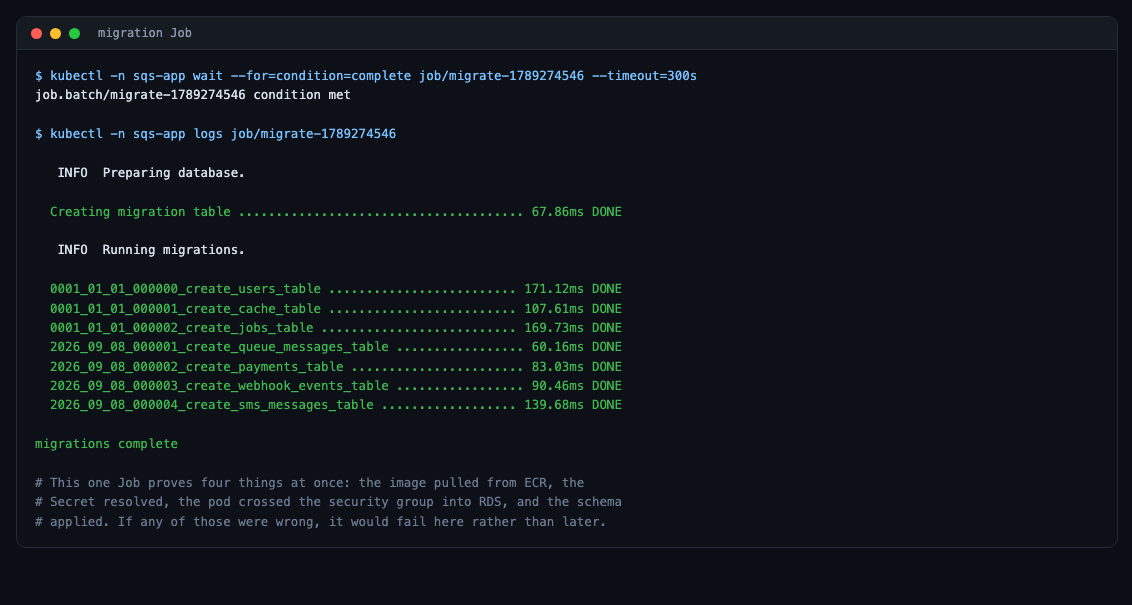
That single Job proves four things at once: the image pulled from ECR, the Secret resolved, the pod crossed the security group into RDS, and the schema applied.
The application
# k8s/backend.yaml (abridged)
apiVersion: apps/v1
kind: Deployment
metadata:
  name: backend
  namespace: sqs-app
spec:
  replicas: 2
  strategy:
    type: RollingUpdate
    rollingUpdate:
      maxSurge: 1
      maxUnavailable: 0
  template:
    spec:
      serviceAccountName: sqs-app
      topologySpreadConstraints:
        - maxSkew: 1
          topologyKey: kubernetes.io/hostname
          whenUnsatisfiable: ScheduleAnyway
          labelSelector:
            matchLabels: { app: backend }
      containers:
        - name: backend
          image: ${ECR_REGISTRY}/${BACKEND_REPO}:${IMAGE_TAG}
          ports:
            - name: http
              containerPort: 8000
          envFrom:
            - configMapRef: { name: backend-config }
            - secretRef:    { name: backend-secret }
          resources:
            requests: { cpu: "100m", memory: "192Mi" }
            limits:   { cpu: "500m", memory: "512Mi" }
          readinessProbe:
            httpGet: { path: /api/health, port: http }
          livenessProbe:
            httpGet: { path: /up, port: http }
          startupProbe:
            httpGet: { path: /up, port: http }
            periodSeconds: 5
            failureThreshold: 30
Four decisions worth explaining:
maxUnavailable: 0 — Kubernetes must add a healthy pod before removing an old one. Deploys cause no downtime.
topologySpreadConstraints — without this, both replicas could land on the same machine, and losing that machine takes the whole API down.
Three different probes, three different questions. Readiness asks “can this pod serve traffic right now?” and hits /api/health, which really checks MySQL, Redis and SQS — a pod that cannot see its dependencies is quietly removed from the Service rather than serving errors. Liveness asks “is this process broken?” and only checks that PHP responds. That difference is deliberate: if liveness also checked the database, one brief RDS hiccup would restart every pod simultaneously and turn a small problem into an outage. Startup gives a slow container 150 seconds before liveness starts counting against it.
requests versus limits — the request is what the scheduler reserves and how it decides which node has room. The limit is the hard ceiling. 100m means one tenth of a CPU core.
The worker: the same image, a different command
# k8s/worker.yaml (abridged)
apiVersion: apps/v1
kind: Deployment
metadata:
  name: worker
  namespace: sqs-app
spec:
  replicas: 1
  template:
    spec:
      serviceAccountName: sqs-app
      # Let a job in flight finish before the pod dies. Without this, SIGTERM
      # cuts the worker off, SQS redelivers, and the job runs twice.
      terminationGracePeriodSeconds: 75
      containers:
        - name: worker
          image: ${ECR_REGISTRY}/${BACKEND_REPO}:${IMAGE_TAG}
          # --timeout must stay <= the queue's VisibilityTimeout (60s).
          command: ["php", "artisan", "queue:work", "sqs",
                    "--sleep=3", "--tries=3", "--timeout=60"]
          envFrom:
            - configMapRef: { name: backend-config }
            - secretRef:    { name: backend-secret }
One image, two Deployments. Scale the worker on its own and watch the queue drain faster:
kubectl -n sqs-app scale deployment/worker --replicas=3The front door
# k8s/ingress.yaml
apiVersion: networking.k8s.io/v1
kind: Ingress
metadata:
  name: sqs-app
  namespace: sqs-app
  annotations:
    alb.ingress.kubernetes.io/scheme: internet-facing
    alb.ingress.kubernetes.io/target-type: ip
    alb.ingress.kubernetes.io/listen-ports: '[{"HTTP": 80}]'
    alb.ingress.kubernetes.io/healthcheck-path: /healthz
    alb.ingress.kubernetes.io/load-balancer-name: sqs-app-alb
spec:
  ingressClassName: alb
  rules:
    - http:
        paths:
          - path: /
            pathType: Prefix
            backend:
              service:
                name: frontend
                port:
                  number: 80
Everything goes to the frontend. The backend has no route from outside at all — the only way in is through the frontend’s nginx proxy. One load balancer, one bill, one public surface.
target-type: ip sends traffic straight to pod addresses rather than through node ports, which removes a hop and makes health checks accurate per pod.
Note listen-ports is HTTP 80 only. There is no HTTPS listener, so https:// will hang rather than refuse — which looks like a broken deployment and is not. Real HTTPS needs a domain and a certificate.
It works
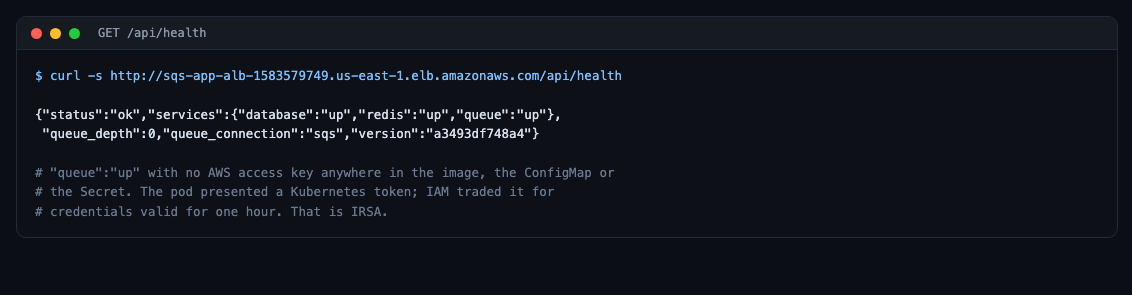
"queue":"up" with no AWS access key anywhere in the image, the ConfigMap or the Secret. That is IRSA.
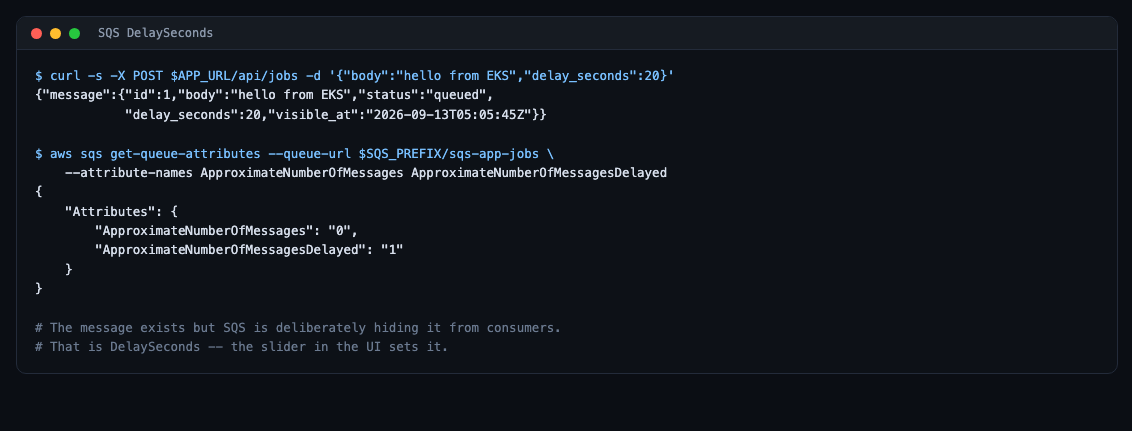
The message exists but SQS is deliberately hiding it. That is DelaySeconds.
What it costs
| Resource | Per hour |
|---|---|
| EKS control plane | $0.100 |
| 2 spot nodes | $0.032 |
| RDS db.t4g.micro | $0.026 |
| Load balancer | $0.027 |
| NAT gateway | $0 (disabled) |
| Total | ~$0.16/hour |
The control plane is 60% of that and cannot be reduced, so the only lever that matters is hours. Practising two hours a day is about $7 a month. Leaving it running is about $115.
The five things that cost us real time
--platform linux/amd64. Without it, pods die with exec format error.
zsh does not word-split. --subnet-ids $LIST passes one tab-containing argument, and RDS complains about “control characters” — a shell problem wearing an AWS costume.
Building is not pushing. docker build -t creates a local name and uploads nothing. The pod then sits in ImagePullBackOff reporting NotFound, which reads like permissions.
https:// on an HTTP-only load balancer hangs instead of refusing, because the security group drops the packets rather than rejecting them.
An extended-support Kubernetes version costs six times more and nothing tells you except the invoice.
—
Next: the passwords in this post are still created by hand with kubectl create secret — which means deleting the namespace destroys them. Part 2 moves them to AWS Parameter Store, so they outlive the cluster.
Be the first to comment