
Moving secrets out of Kubernetes and into AWS Parameter Store
In part one we deployed an app to EKS. Its passwords were created like this:
kubectl -n sqs-app create secret generic backend-secret \
  --from-literal=APP_KEY="base64:$(openssl rand -base64 32)" \
  --from-literal=DB_PASSWORD="$RDS_PASSWORD" \
  ...
That works. It is also a trap, and this post is about why, what replaces it, and exactly which files change.
The problem, in one sentence
A secret created that way exists nowhere except inside the cluster.
There is no file on disk. k8s/secret.yaml is gitignored, and the command is imperative — it leaves no artifact. So the moment the namespace goes, the secret goes.
I learned this the expensive way on an earlier project: I deleted a namespace to unstick a node drain, and APP_KEY went with it. In Laravel that key encrypts sessions and any encrypted column. A new key means none of it can be read again.
That project survived because the data was disposable. The next one might not be.
And it gets worse with a cost-conscious workflow. This cluster is torn down most nights to save money — about $0.16/hour adds up. Every rebuild would mean a brand new APP_KEY, so every rebuild invalidates everything encrypted by the previous one.
What Parameter Store changes
kubectl create secret | Parameter Store | |
|---|---|---|
| Source of truth | a command you typed | SSM |
| Survives cluster deletion | no | yes |
| Copy on your laptop | shell history | none |
| Audit trail | none | CloudTrail |
| Rotation | retype everything | update the parameter, restart |
| Cost | free | free (standard parameters) |
Be clear about what it does not do. The values still end up in a Kubernetes Secret, still base64 in etcd, still readable by anyone with namespace read access. Parameter Store does not make them more secret inside the cluster.
What it changes is where the truth lives. That is the row that matters.
Why Parameter Store and not Secrets Manager
| Option | Cost | Notes |
|---|---|---|
| Kubernetes Secret | free | dies with the cluster, no audit trail |
| Parameter Store (Standard) | free | 10,000 parameters, 4KB each |
| Parameter Store (Advanced) | ~$0.05/param/month | 8KB, higher throughput |
| Secrets Manager | ~$0.40/secret/month | rotation, replication, resource policies |
Seven parameters cost nothing. The same seven in Secrets Manager would be about $2.80 a month — trivial, but there is no reason to pay it here.
Secrets Manager earns its price for one thing in particular: automatic rotation of RDS credentials. It generates a new password, updates the database, and updates the secret on a schedule. Replicating that yourself is real work. A sensible production split is the database password in Secrets Manager and everything else in Parameter Store — the same driver reads both.
How the pieces fit
      SSM Parameter Store
      /sqs-app/APP_KEY, DB_PASSWORD, STRIPE_SECRET, ...
              │
              │  the CSI driver authenticates as the pod's
              │  service account (IRSA) -- no stored key
              ▼
      mounted at /mnt/secrets-store
              +
      synced into Secret "backend-secret"
              │  envFrom: secretRef
              ▼
      container environment → the application
The application code does not change at all. It still reads environment variables. Only their origin moves.
—
File by file: what actually changes
1. New — the parameters themselves
Not a file exactly, but the first step. Written by a script so nobody types a password:
#!/usr/bin/env bash
# deploy/put-parameters.sh (abridged)
set -euo pipefail
source deploy/env.sh

# Reuse the APP_KEY the cluster already runs, if there is one. Only invent a
# new key when nothing anywhere has one -- this is what makes a rebuilt
# cluster pick up yesterday's key instead of breaking every encrypted value.
APP_KEY="$(kubectl -n "$K8S_NAMESPACE" get secret backend-secret \
            -o jsonpath='{.data.APP_KEY}' 2>/dev/null | base64 -d || true)"

if [ -z "$APP_KEY" ]; then
    APP_KEY="$(aws ssm get-parameter --region "$AWS_REGION" \
                 --name /sqs-app/APP_KEY --with-decryption \
                 --query 'Parameter.Value' --output text 2>/dev/null || true)"
fi

if [ -z "$APP_KEY" ]; then
    APP_KEY="base64:$(openssl rand -base64 32)"
    echo "!! no existing APP_KEY found - generated a new one"
fi

# Refuse to write a blank value. An empty APP_KEY would silently break every
# session and encrypted value in the cluster.
for v in APP_KEY RDS_ENDPOINT STRIPE_SECRET_VAL; do
    [ -n "${!v:-}" ] || { echo "ERROR: $v is empty" >&2; exit 1; }
done

put() {
    aws ssm put-parameter --region "$AWS_REGION" \
        --name "/sqs-app/$1" --value "$2" --type "$3" --overwrite >/dev/null
}

put APP_KEY               "$APP_KEY"            SecureString
put DB_PASSWORD           "$RDS_PASSWORD"       SecureString
put STRIPE_SECRET         "$STRIPE_SECRET_VAL"  SecureString
put DB_HOST               "$RDS_ENDPOINT"       String
put DB_USERNAME           "$RDS_USER"           String
# Publishable key -- it ships to browsers anyway, so encrypting it is theatre.
put STRIPE_KEY            "$STRIPE_KEY_VAL"     String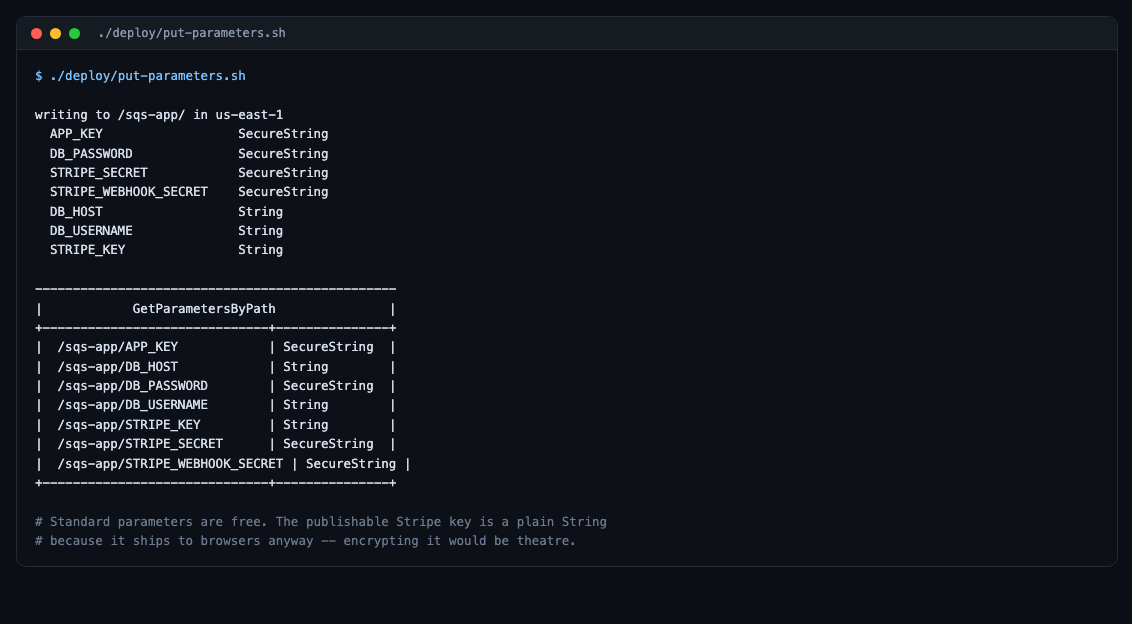
SecureString encrypts with KMS. Using the default aws/ssm key costs nothing; requests are about $0.03 per 10,000.
2. New — deploy/iam/ssm-access-policy.json
The pods already have an IRSA role for SQS. It needs one more permission:
{
  "Version": "2012-10-17",
  "Statement": [
    {
      "Sid": "ReadAppParameters",
      "Effect": "Allow",
      "Action": ["ssm:GetParameter", "ssm:GetParameters", "ssm:GetParametersByPath"],
      "Resource": "arn:aws:ssm:REGION:ACCOUNT_ID:parameter/sqs-app/*"
    },
    {
      "Sid": "DecryptSecureStrings",
      "Effect": "Allow",
      "Action": "kms:Decrypt",
      "Resource": "*",
      "Condition": {
        "StringEquals": { "kms:ViaService": "ssm.REGION.amazonaws.com" }
      }
    }
  ]
}
Two details worth noticing. The parameter path is scoped to /sqs-app/*, not all of SSM. And kms:Decrypt is granted only when the call arrives via SSM — that condition means the role cannot decrypt anything else with that key.
aws iam put-role-policy --role-name SqsAppQueueAccessRole \
  --policy-name SqsAppParameterAccess --policy-document file:///tmp/ssm-policy.json
Inline rather than a managed policy, so it is deleted along with the role.
3. New — k8s/secret-provider-class.yaml
This is the piece that does the work:
apiVersion: secrets-store.csi.x-k8s.io/v1
kind: SecretProviderClass
metadata:
  name: sqs-app-params
  namespace: sqs-app
spec:
  provider: aws
  parameters:
    objects: |
      - objectName: "/sqs-app/APP_KEY"
        objectType: "ssmparameter"
        objectAlias: "APP_KEY"
      - objectName: "/sqs-app/DB_HOST"
        objectType: "ssmparameter"
        objectAlias: "DB_HOST"
      - objectName: "/sqs-app/DB_PASSWORD"
        objectType: "ssmparameter"
        objectAlias: "DB_PASSWORD"
      - objectName: "/sqs-app/STRIPE_SECRET"
        objectType: "ssmparameter"
        objectAlias: "STRIPE_SECRET"
  secretObjects:
    - secretName: backend-secret
      type: Opaque
      data:
        - objectName: APP_KEY
          key: APP_KEY
        - objectName: DB_HOST
          key: DB_HOST
        - objectName: DB_PASSWORD
          key: DB_PASSWORD
        - objectName: STRIPE_SECRET
          key: STRIPE_SECRET
parameters.objects says what to fetch. secretObjects says to also write them into a Kubernetes Secret — which is what keeps envFrom working with no application change.
4. Changed — k8s/backend.yaml and k8s/worker.yaml
Only an addition. The envFrom block stays exactly as it was:
          envFrom:
            - configMapRef: { name: backend-config }
            - secretRef:    { name: backend-secret }     # unchanged

          # NEW
          volumeMounts:
            - name: secrets-store
              mountPath: /mnt/secrets-store
              readOnly: true

      # NEW
      volumes:
        # The SecretProviderClass only syncs into a Kubernetes Secret while a
        # pod mounts it. Without this volume the Secret is never created, even
        # though nothing here reads the files directly -- envFrom does the work.
        - name: secrets-store
          csi:
            driver: secrets-store.csi.k8s.io
            readOnly: true
            volumeAttributes:
              secretProviderClass: "sqs-app-params"
That comment is the non-obvious bit. The volume looks pointless — nothing reads /mnt/secrets-store. But the sync only happens as a side effect of mounting. No volume, no Secret, and the pods start with no database password.
5. Removed — the imperative kubectl create secret
Gone entirely. Nothing types a password any more.
—
Installing the driver
helm repo add secrets-store-csi-driver \
  https://kubernetes-sigs.github.io/secrets-store-csi-driver/charts
helm repo update

helm install csi-secrets-store \
  secrets-store-csi-driver/secrets-store-csi-driver -n kube-system \
  --set syncSecret.enabled=true \
  --set 'tokenRequests[0].audience=sts.amazonaws.com'

kubectl apply -f \
  https://raw.githubusercontent.com/aws/secrets-store-csi-driver-provider-aws/main/deployment/aws-provider-installer.yaml
The three things that will break
1. tokenRequests is not a chart default
This cost us fifteen minutes and produced an error that points nowhere near the cause:
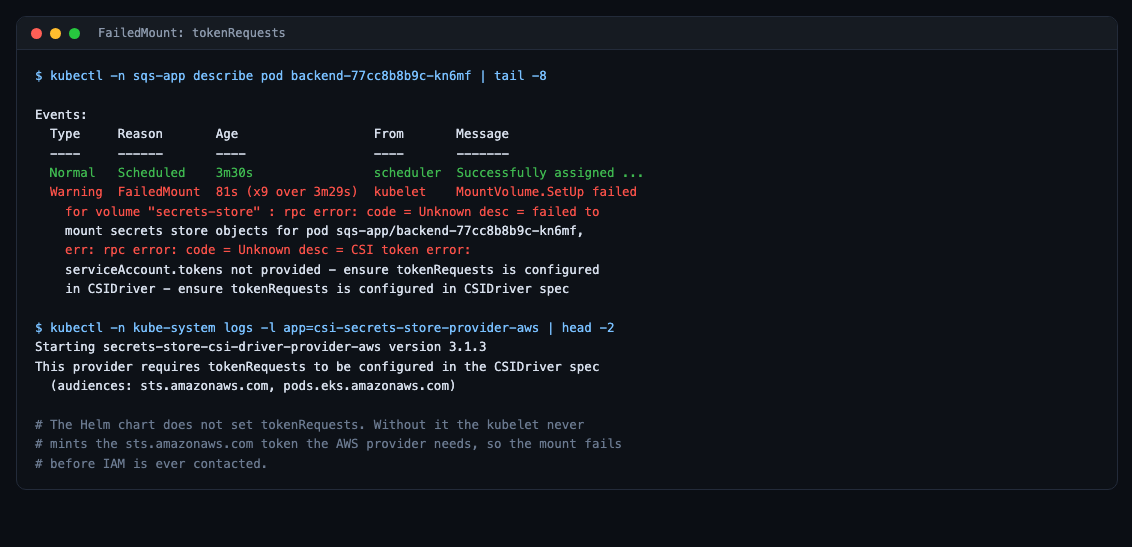
The AWS provider calls AssumeRoleWithWebIdentity as your pod’s service account. For that it needs a token minted with the audience sts.amazonaws.com. The kubelet only mints one if the cluster-scoped CSIDriver object asks for it via tokenRequests — and the Helm chart does not ask by default.
So the mount fails before IAM is ever contacted. Your IAM policy can be perfect and it still will not work.
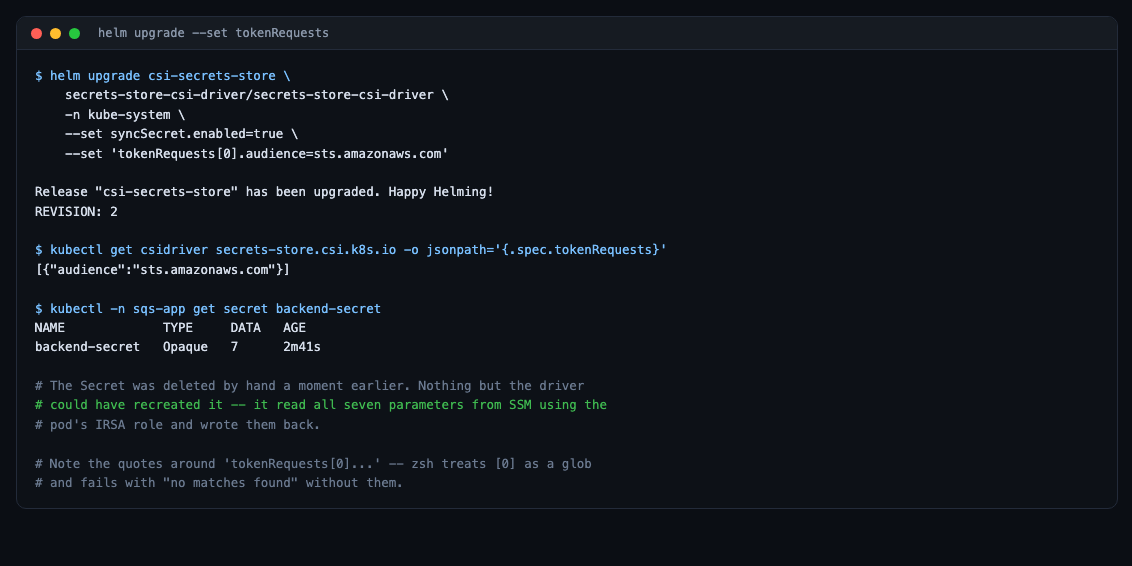
Quote the flag. zsh expands unquoted [0] as a filename glob and fails with no matches found:
--set 'tokenRequests[0].audience=sts.amazonaws.com'2. syncSecret.enabled=true is required
Without it, parameters mount as files under /mnt/secrets-store but no Kubernetes Secret is created. envFrom: secretRef then resolves to nothing and the pods start with no database password — and no error saying why.
3. The driver will not adopt a Secret it does not own
If backend-secret already exists because you created it by hand, the driver silently declines to take it over. Delete it first — safe, once the values are in SSM:
kubectl -n sqs-app delete secret backend-secretEqually worth knowing: the Secret exists only while a pod mounting the volume is running. Delete every such pod and it disappears. That is intended.
Proving it worked
kubectl -n sqs-app get secret backend-secret -o jsonpath='{.metadata.labels}'Look for secrets-store.csi.k8s.io/managed":"true".
The stronger proof is behavioural: delete the Secret, and watch it come back with all its keys. Nothing else in the cluster could have done that.
And compare what SSM holds against what the pod received:
aws ssm get-parameter --name /sqs-app/DB_HOST --query Parameter.Value --output text
kubectl -n sqs-app exec deploy/backend -- printenv DB_HOST
Rotation, which is now one command
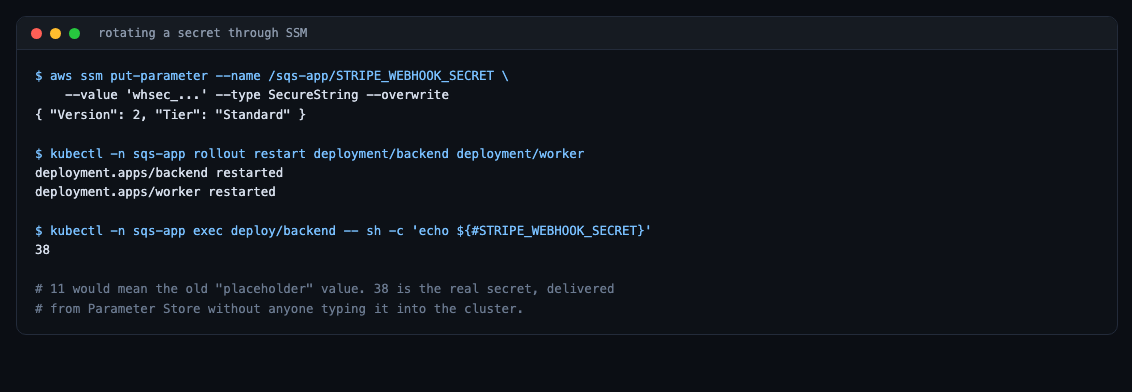
aws ssm put-parameter --name /sqs-app/STRIPE_WEBHOOK_SECRET \
  --value 'whsec_...' --type SecureString --overwrite

kubectl -n sqs-app rollout restart deployment/backend deployment/worker
The driver fetches at mount time, so a restart is what picks up a new value. (Enabling the rotation reconciler removes even that.)
Parameter Store keeps version history, so you can see what changed and when.
Going one step further: nobody types the database password either
The version above still had an inconsistency. The pods read the password from Parameter Store, but the deploy script read it from a local file when creating RDS. Two sources for one value.
# deploy/lib.sh
# Fetch a parameter, or create it with a generated value if it does not exist.
# This breaks the chicken-and-egg: the password must exist before RDS is
# created, but nothing should ever type or store it by hand.
ensure_param() {
    local name="$1" value

    value="$(aws ssm get-parameter --region "$AWS_REGION" \
               --name "$name" --with-decryption \
               --query 'Parameter.Value' --output text 2>/dev/null || true)"

    if [ -z "$value" ] || [ "$value" = "None" ]; then
        # RDS and MySQL both reject / @ " and spaces.
        value="$(openssl rand -base64 24 | tr -d '/@" ' | cut -c1-24)"
        aws ssm put-parameter --region "$AWS_REGION" \
            --name "$name" --value "$value" --type SecureString >/dev/null
    fi

    printf '%s' "$value"
}
Now the deploy script starts with:
RDS_PASSWORD="$(ensure_param /sqs-app/DB_PASSWORD)"The password is generated on first deploy, stored, and never typed, never written to a file, never seen by anyone. RDS and the pods read the same value, so they cannot drift apart.
The payoff shows up in the settings template, which now contains no secret at all and could safely be committed:
# deploy/env.sh.example
export AWS_REGION=us-east-1
export CLUSTER_NAME=sqs-app-cluster
export K8S_NAMESPACE=sqs-app
export RDS_ID=sqs-app-mysql
export RDS_USER=sqs_app
# No password here. It is generated on first deploy and stored at
# /sqs-app/DB_PASSWORD, the single source of truth for both RDS and the pods.
What this bought
- Rebuilding the cluster no longer loses
APP_KEY. The daily teardown is now genuinely safe. - No secret touches shell history or a file on disk.
- Rotation is two commands instead of retyping everything.
- CloudTrail records every read.
- It costs nothing.
—
Next: part three replaces the manual deploy with GitHub Actions — push to main and the cluster updates itself, using OIDC so no AWS key is stored in GitHub either.
Be the first to comment