
Rebuilding the same EKS deployment in Terraform, and the three bugs it uncovered
The first three posts built an application on EKS with eksctl, shell scripts and a lot of aws CLI commands. It worked. This post rebuilds exactly the same thing in Terraform — same application, same region, same cost — and the interesting part is not the Terraform.
The interesting part is that rebuilding from nothing is a test, and it failed three times in ways the original never would have shown.
The decision that shapes everything: split by lifecycle
Most Terraform tutorials put an EKS deployment in one root module. That would be wrong here, for three reasons.
terraform-version/
  01-state/        S3 bucket for state                      once, forever
  02-persistent/   ECR, SQS, SSM parameters, CI IAM role    once, forever
  03-network/      VPC, subnets, routing                    daily
  04-cluster/      EKS control plane, spot node group       daily
  05-database/     RDS, subnet group, security group        daily
  06-platform/     IRSA roles, ALB controller, CSI driver   daily
It matches how the thing is actually used. This cluster comes down most nights to save money. One state file means terraform destroy takes the registry, the queue and APP_KEY with it — and losing APP_KEY invalidates every encrypted value in the database.
It solves the provider chicken-and-egg. The kubernetes and helm providers need cluster credentials that do not exist until the cluster does, and Terraform resolves provider configuration at plan time. A single module cannot create a cluster and then configure a provider against it. Two applies sidesteps it entirely:
provider "helm" {
  kubernetes {
    host                   = data.terraform_remote_state.cluster.outputs.cluster_endpoint
    cluster_ca_certificate = base64decode(data.terraform_remote_state.cluster.outputs.cluster_certificate_authority_data)
    token                  = data.aws_eks_cluster_auth.this.token
  }
}
Blast radius. A mistake in the cluster module cannot delete the registry.
The cost is plumbing — later steps read earlier outputs through terraform_remote_state rather than sharing variables. A production setup might merge 03–06 and accept a slower plan. For learning, six small plans beat one plan with ninety resources in it.
Where Terraform stops
Application manifests stay in GitHub Actions. Terraform owns infrastructure and cluster-level addons; CI owns Deployments, Services and the Ingress.
The dividing line is change rate. Infrastructure changes rarely; the app deploys many times a day. If Terraform owned the Deployments, every code push would run a plan against the VPC.
—
Step 1 — The state bucket, which is not Terraform
./terraform-version/01-state/bootstrap-state.sh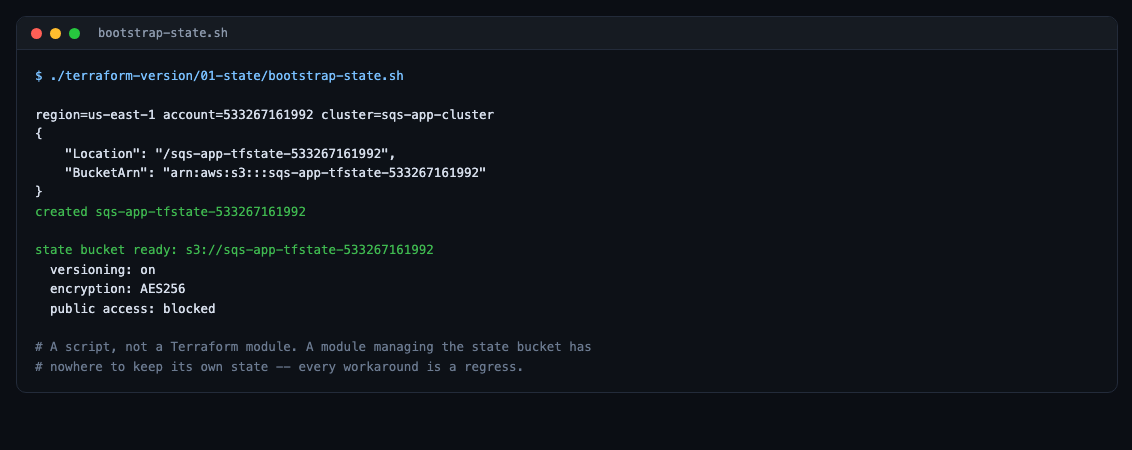
A script rather than a module, on purpose. A Terraform module that manages the state bucket has nowhere to keep its own state. Every workaround is a regress — bootstrap with local state and migrate, or commit a state file, or manage it from another bucket that has the same problem. A one-off idempotent script is the honest answer.
Three things matter in it:
aws s3api put-bucket-versioning --bucket "$BUCKET" \
    --versioning-configuration Status=Enabled

aws s3api put-bucket-encryption --bucket "$BUCKET" \
    --server-side-encryption-configuration \
    '{"Rules":[{"ApplyServerSideEncryptionByDefault":{"SSEAlgorithm":"AES256"}}]}'

aws s3api put-public-access-block --bucket "$BUCKET" \
    --public-access-block-configuration \
    'BlockPublicAcls=true,IgnorePublicAcls=true,BlockPublicPolicy=true,RestrictPublicBuckets=true'
Versioning is the rollback path when an apply corrupts state. Encryption matters because state contains secrets in plaintext — the database password among them.
Locking uses S3 natively:
backend "s3" {
  key          = "persistent/terraform.tfstate"
  region       = "us-east-1"
  encrypt      = true
  use_lockfile = true
}
use_lockfile arrived in Terraform 1.10 and removes the DynamoDB table every older tutorial tells you to create.
Step 2 — Adopting infrastructure that already exists
The ECR repositories, the SQS queue, six SSM parameters and the CI IAM role all already existed, created by hand in the earlier posts. Recreating them would break the pipeline and lose the secrets.
Terraform 1.5+ has declarative import blocks, which are much safer than the terraform import command because plan shows what will be adopted before anything happens:
import {
  to = aws_sqs_queue.jobs
  id = "https://sqs.us-east-1.amazonaws.com/ACCOUNT/sqs-app-jobs"
}

import {
  to = aws_ssm_parameter.external["APP_KEY"]
  id = "/sqs-app/APP_KEY"
}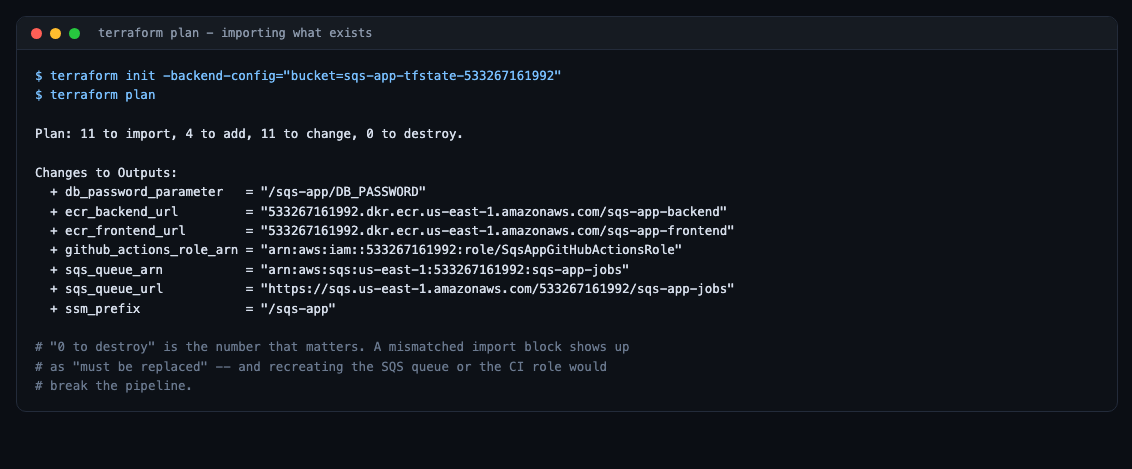
0 to destroy is the number that matters. A mismatched import id shows up as “must be replaced”, and applying would recreate the SQS queue or the CI role.
But 11 to change is alarming until you know what changes. Rather than reading a thousand-line plan, a small script answers the one question that matters — is any secret about to be overwritten?
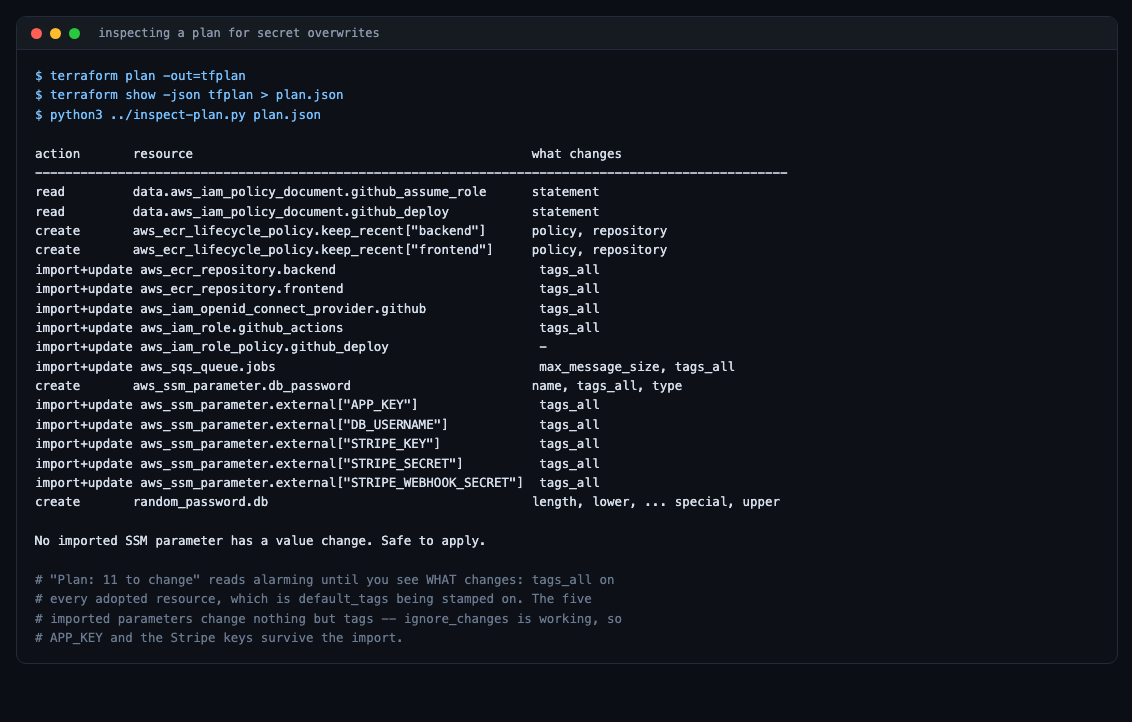
Every change was tags_all — default_tags being stamped onto adopted resources. No parameter value touched.
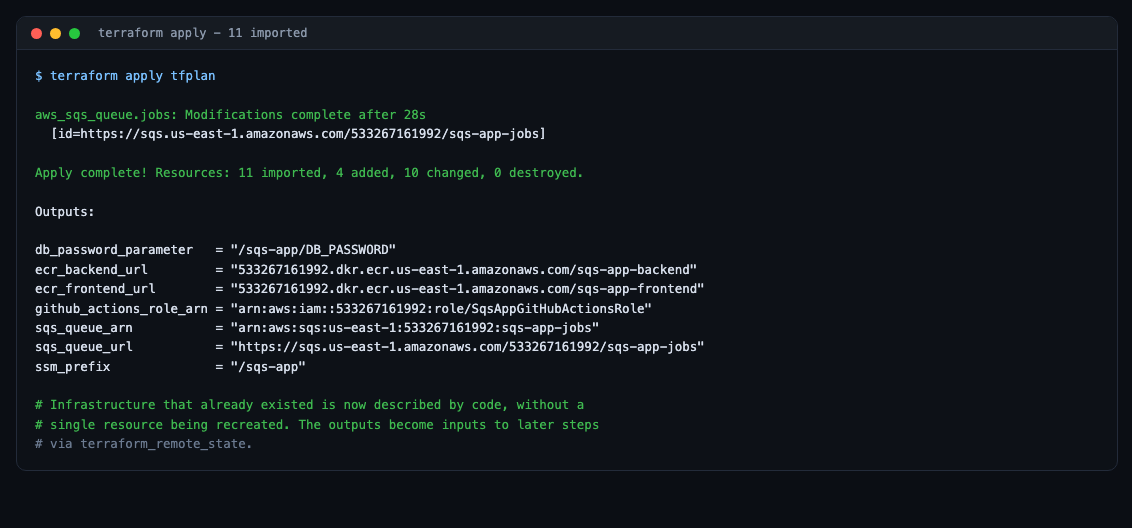
Infrastructure that already existed is now described by code, without a single resource being recreated.
Parameter Store, in two patterns
Teams absolutely do manage Parameter Store with Terraform. The interesting question is not whether but who owns the value, and the answer differs per parameter.
Terraform generates it — the database password:
resource "random_password" "db" {
  length  = 24
  special = false     # RDS rejects / @ " and spaces
}

resource "aws_ssm_parameter" "db_password" {
  name  = "/${var.project}/DB_PASSWORD"
  type  = "SecureString"
  value = random_password.db.result
}
The database layer reads it back with a data source, so RDS and the pods cannot drift apart, and nobody ever sees or types the value.
Terraform only guarantees it exists — the Stripe keys and APP_KEY:
resource "aws_ssm_parameter" "external" {
  for_each = local.externally_set

  name  = "/${var.project}/${each.key}"
  type  = each.value
  value = "set-me"

  lifecycle {
    ignore_changes = [value]
  }
}
Terraform cannot invent a Stripe key, and regenerating APP_KEY on every apply would invalidate every encrypted value. ignore_changes is what lets the import adopt the real values without reverting them.
Be honest about the limitation: both patterns put values in state in plaintext. Encrypted bucket, versioning and tight access mitigate it; they do not eliminate it. Terraform 1.11’s write-only arguments (password_wo) are the actual fix where the provider supports them.
—
Bug one: the subnet default that would have broken every node
The network plan looked clean. It was not.
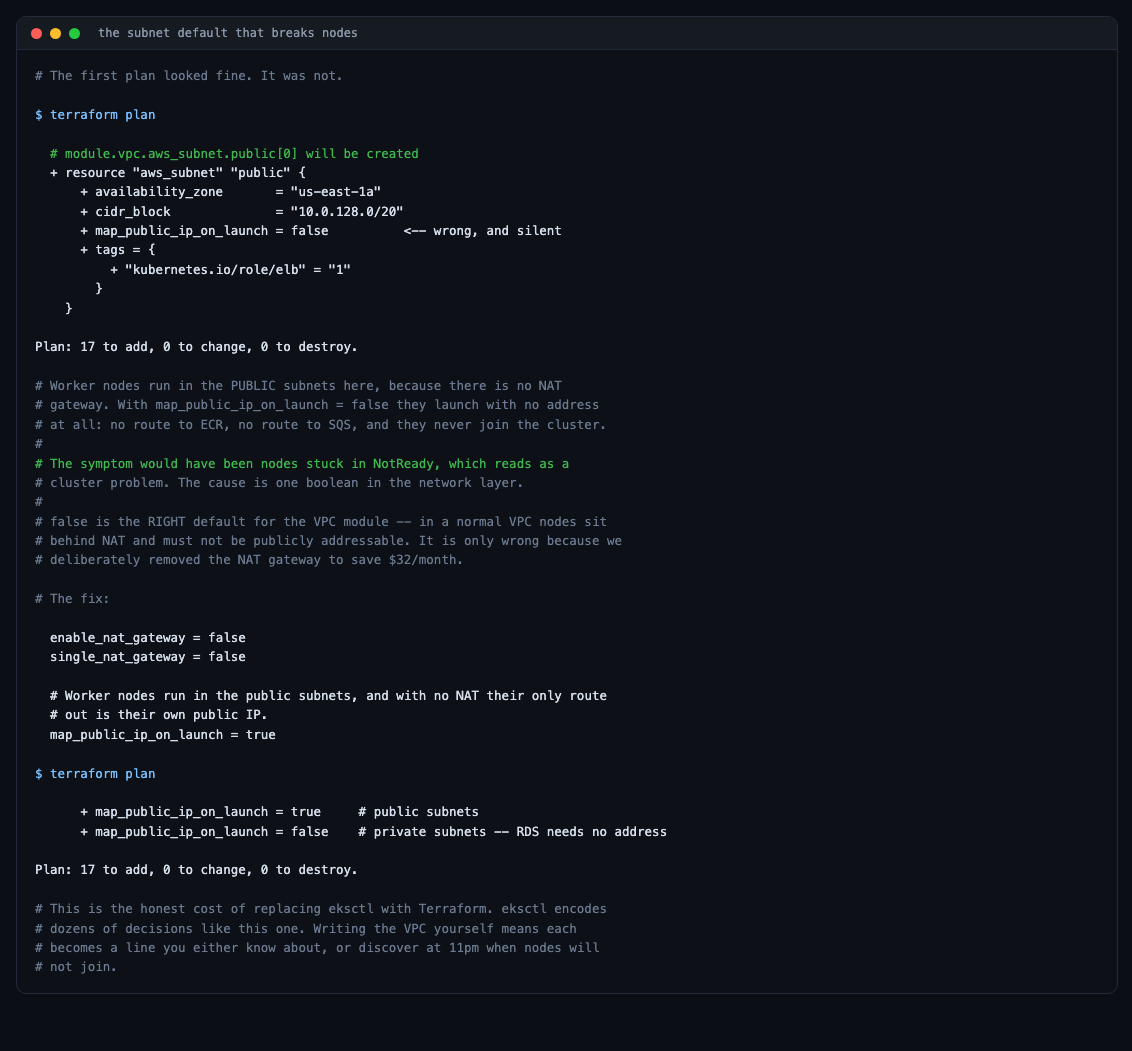
+ resource "aws_subnet" "public" {
    + map_public_ip_on_launch = false     <-- silent, and fatal here
  }
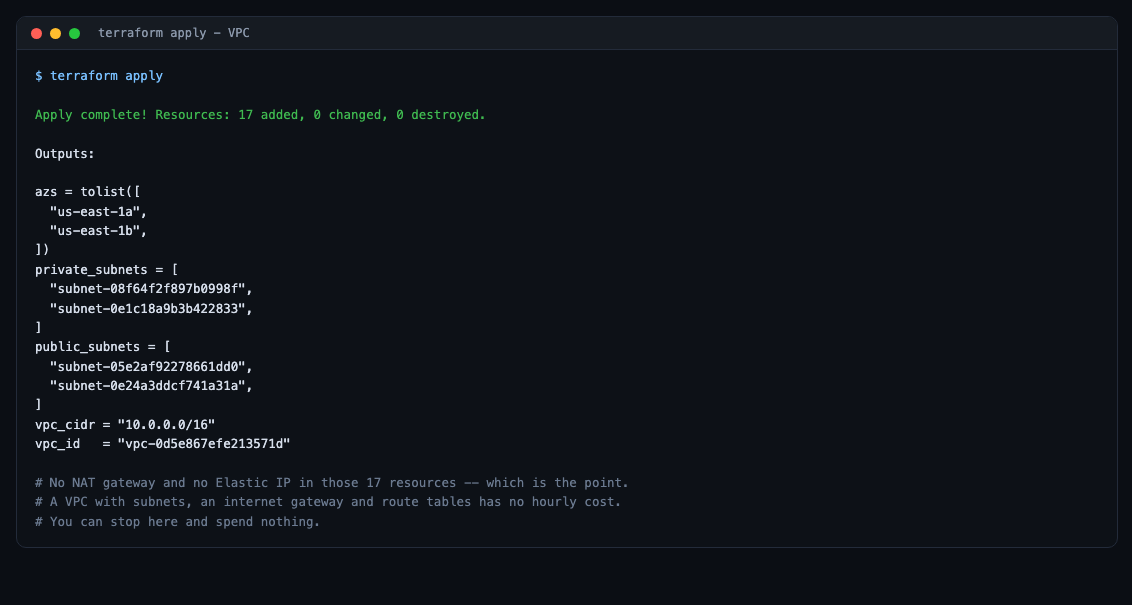
There is no NAT gateway in this setup — it saves about $32/month — so worker nodes run in the public subnets, and their own public IP is their only route to ECR, SQS and the EKS API. With map_public_ip_on_launch = false they launch with no address at all and never join the cluster.
The symptom would have been nodes stuck in NotReady, which reads as a cluster problem. The cause is one boolean in the network layer.
And false is the right default for the VPC module. In a normal VPC, nodes sit behind NAT and must not be publicly addressable. It is only wrong because we deliberately removed the NAT gateway.
enable_nat_gateway = false
single_nat_gateway = false

# Worker nodes run in the public subnets, and with no NAT their only route out
# is their own public IP.
map_public_ip_on_launch = true
The subnet tags matter just as much, and are just as invisible:
public_subnet_tags = {
  "kubernetes.io/role/elb"                    = 1
  "kubernetes.io/cluster/${var.cluster_name}" = "shared"
}

private_subnet_tags = {
  "kubernetes.io/role/internal-elb"           = 1
  "kubernetes.io/cluster/${var.cluster_name}" = "shared"
}
The load balancer controller discovers subnets by these tags. Get them wrong and an Ingress is created, sits with an empty ADDRESS forever, and nothing explains why. eksctl applied them for you.
Step 4 — Two quietly expensive defaults
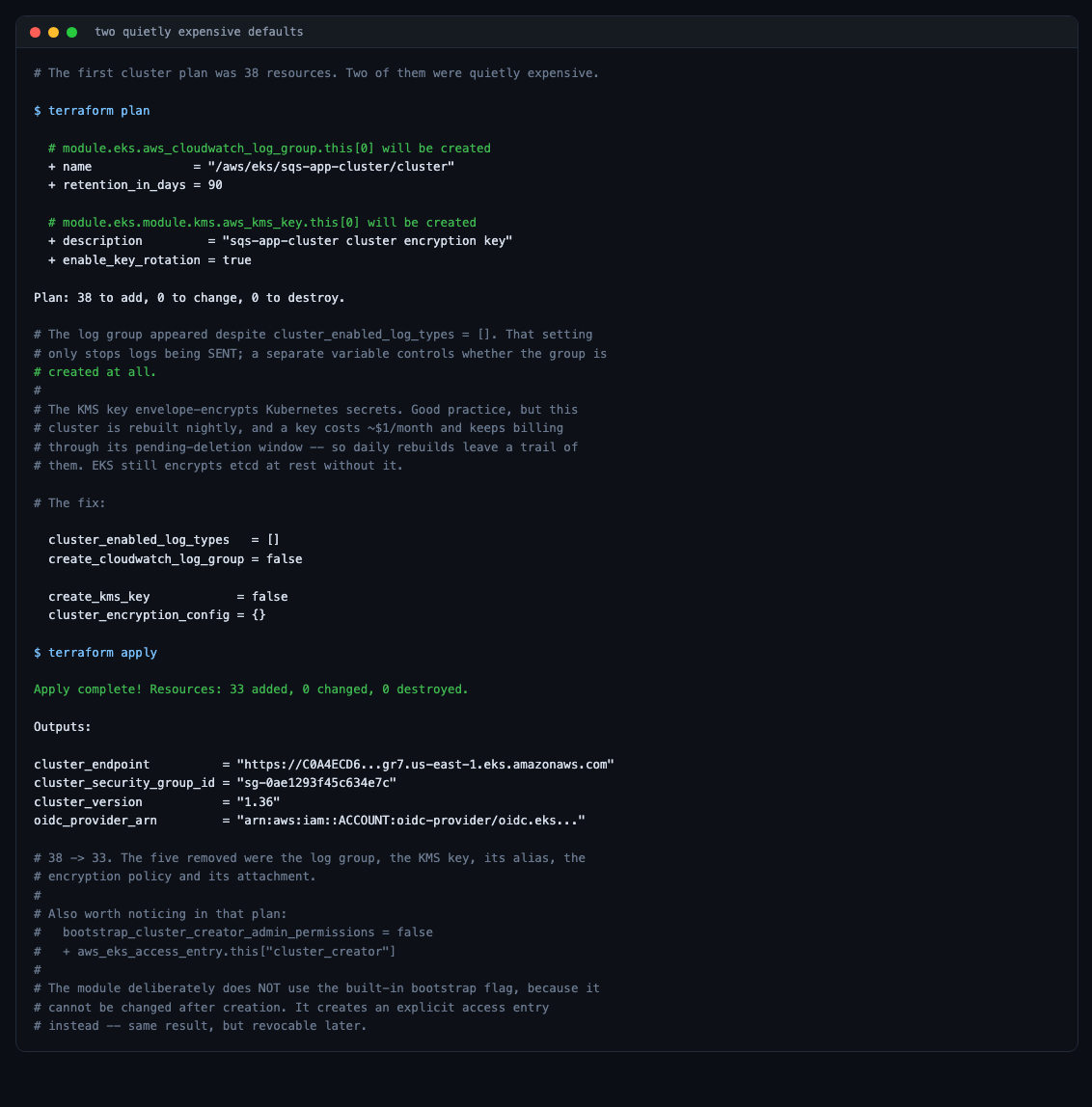
The first cluster plan was 38 resources. Two of them cost money for no benefit in a cluster that is rebuilt nightly.
A CloudWatch log group appeared despite cluster_enabled_log_types = []. That setting only stops logs being sent; a separate variable controls whether the group is created.
A KMS key for envelope-encrypting Kubernetes secrets. Good practice for something long-lived, but a key costs ~$1/month and keeps billing through its pending-deletion window — so daily rebuilds leave a trail of them. EKS still encrypts etcd at rest without it.
cluster_enabled_log_types   = []
create_cloudwatch_log_group = false

create_kms_key            = false
cluster_encryption_config = {}
38 → 33.
Three other settings in that module are worth knowing:
# The modern access-entry API. Most tutorials still show the deprecated
# aws-auth ConfigMap.
authentication_mode = "API"

# Without this the creating identity has NO Kubernetes permissions and every
# kubectl command fails with "Unauthorized" on a cluster you just built.
enable_cluster_creator_admin_permissions = true

enable_irsa = true
And an elegant detail in the plan: the module sets bootstrap_cluster_creator_admin_permissions = false on the cluster and creates a separate aws_eks_access_entry instead. The built-in flag cannot be changed after creation; an explicit access entry can be revoked later.
Bug two: a timeout that was a security group
The migration Job got further this time — image pulled, secrets mounted, Laravel booted — and then:
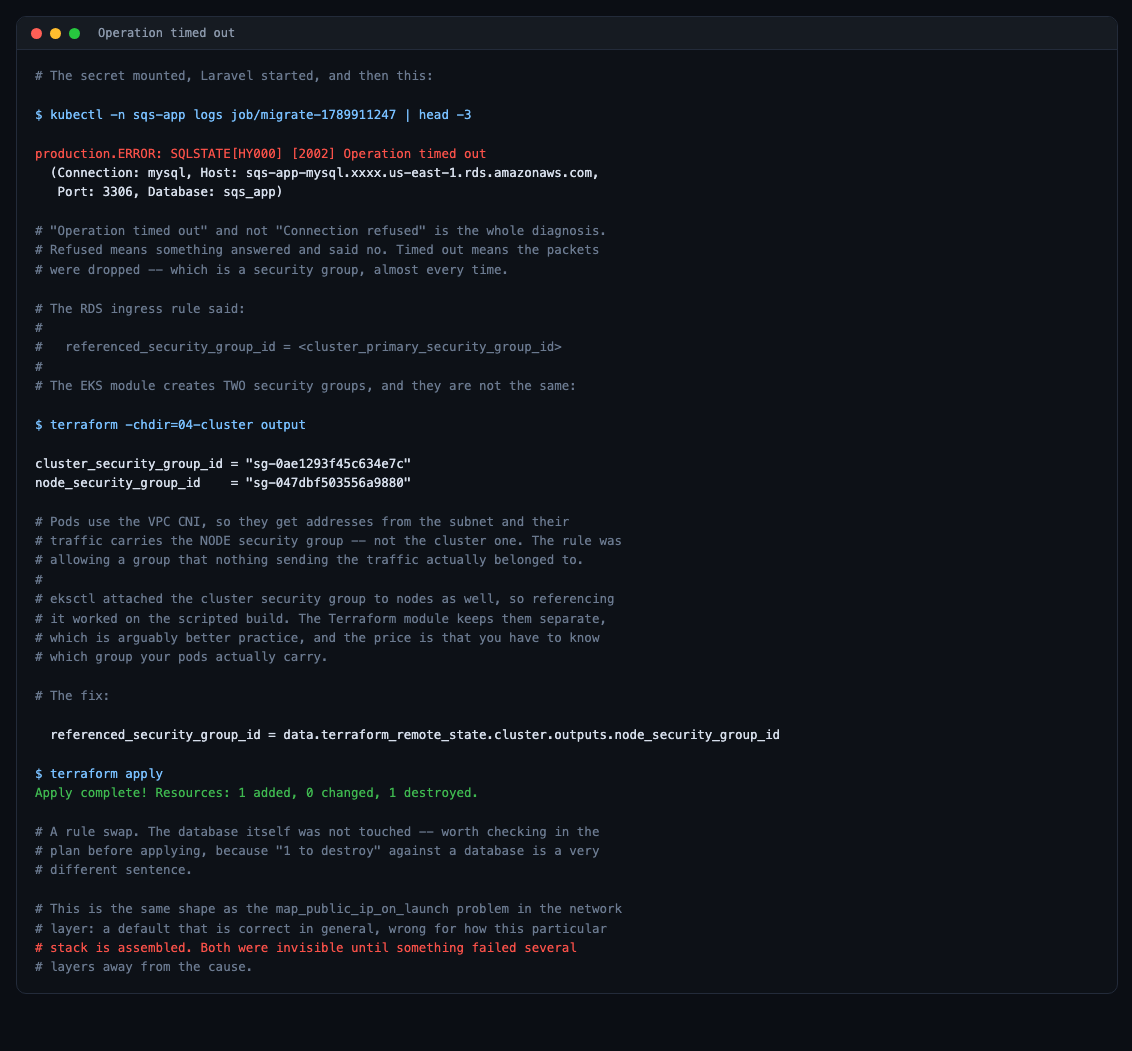
SQLSTATE[HY000] [2002] Operation timed out“Timed out” rather than “Connection refused” is the entire diagnosis. Refused means something answered and said no. Timed out means packets were dropped — which is a security group, nearly every time.
The RDS ingress rule referenced the cluster security group. The EKS module creates two, and they are not the same thing:
cluster_security_group_id = "sg-0ae1293f45c634e7c"
node_security_group_id    = "sg-047dbf503556a9880"
Pods use the VPC CNI, so they take addresses from the subnet and their traffic carries the node security group. The rule was allowing a group that nothing sending the traffic belonged to.
eksctl attached the cluster security group to nodes as well, so referencing it worked in the scripted build. The Terraform module keeps them separate — which is arguably better practice — and the price is knowing which group your pods actually carry.
resource "aws_vpc_security_group_ingress_rule" "mysql_from_nodes" {
  security_group_id = aws_security_group.rds.id

  referenced_security_group_id = data.terraform_remote_state.cluster.outputs.node_security_group_id
  from_port                    = 3306
  to_port                      = 3306
  ip_protocol                  = "tcp"
}
A security group rather than a CIDR, because pod addresses change constantly and the security group does not.
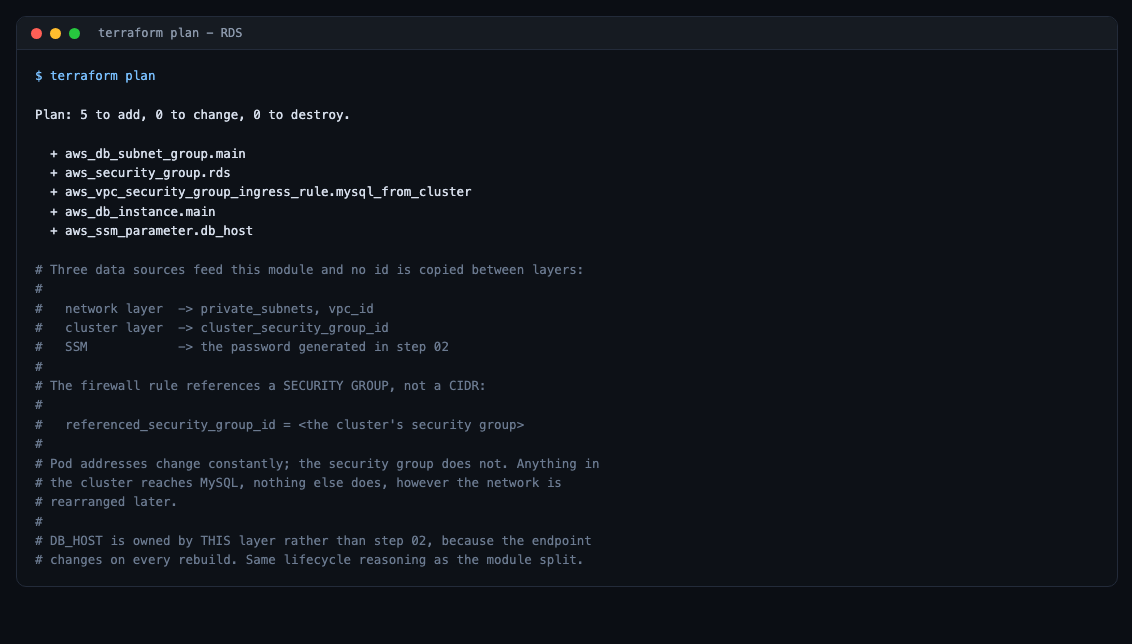
Note that DB_HOST is owned by the database layer, not the persistent one — the endpoint changes on every rebuild, so it belongs with the thing that creates it. Same lifecycle reasoning as the module split.
Step 6 — Platform, and a Terraform limitation worth knowing
IRSA roles are written out explicitly rather than hidden behind an eksctl command, and the trust condition is the whole security model:
condition {
  test     = "StringEquals"
  variable = "${local.oidc_url}:sub"
  values   = ["system:serviceaccount:${var.namespace}:${var.service_account}"]
}
A pod presents a signed token asserting “I am service account X in namespace Y of this cluster”. That condition makes the role trust exactly that sentence. A wildcard would let any pod in the cluster assume it.
The CSI driver carries the setting that cost fifteen minutes in the previous post, and it is not a chart default:
# The AWS provider calls AssumeRoleWithWebIdentity as the pod's service
# account, which needs a token minted with this audience. The kubelet only
# mints one if the cluster-scoped CSIDriver object asks for it.
set {
  name  = "tokenRequests[0].audience"
  value = "sts.amazonaws.com"
}
Without it, every mount fails with serviceAccount.tokens not provided before IAM is ever contacted — so a perfectly correct IAM policy still will not work.
What this module deliberately cannot do
The namespace, the SecretProviderClass and the CI RBAC are applied with kubectl, not Terraform. That is a real limitation, not a preference.
kubernetes_manifest validates a resource against the cluster’s API at plan time. The SecretProviderClass CRD does not exist until the CSI driver helm release has been applied — so a module that installs the driver and creates a SecretProviderClass cannot plan. It fails with failed to construct REST mapping, and no amount of depends_on fixes it, because the problem is plan-time rather than apply-time.
Bug three: the one only a clean rebuild could find
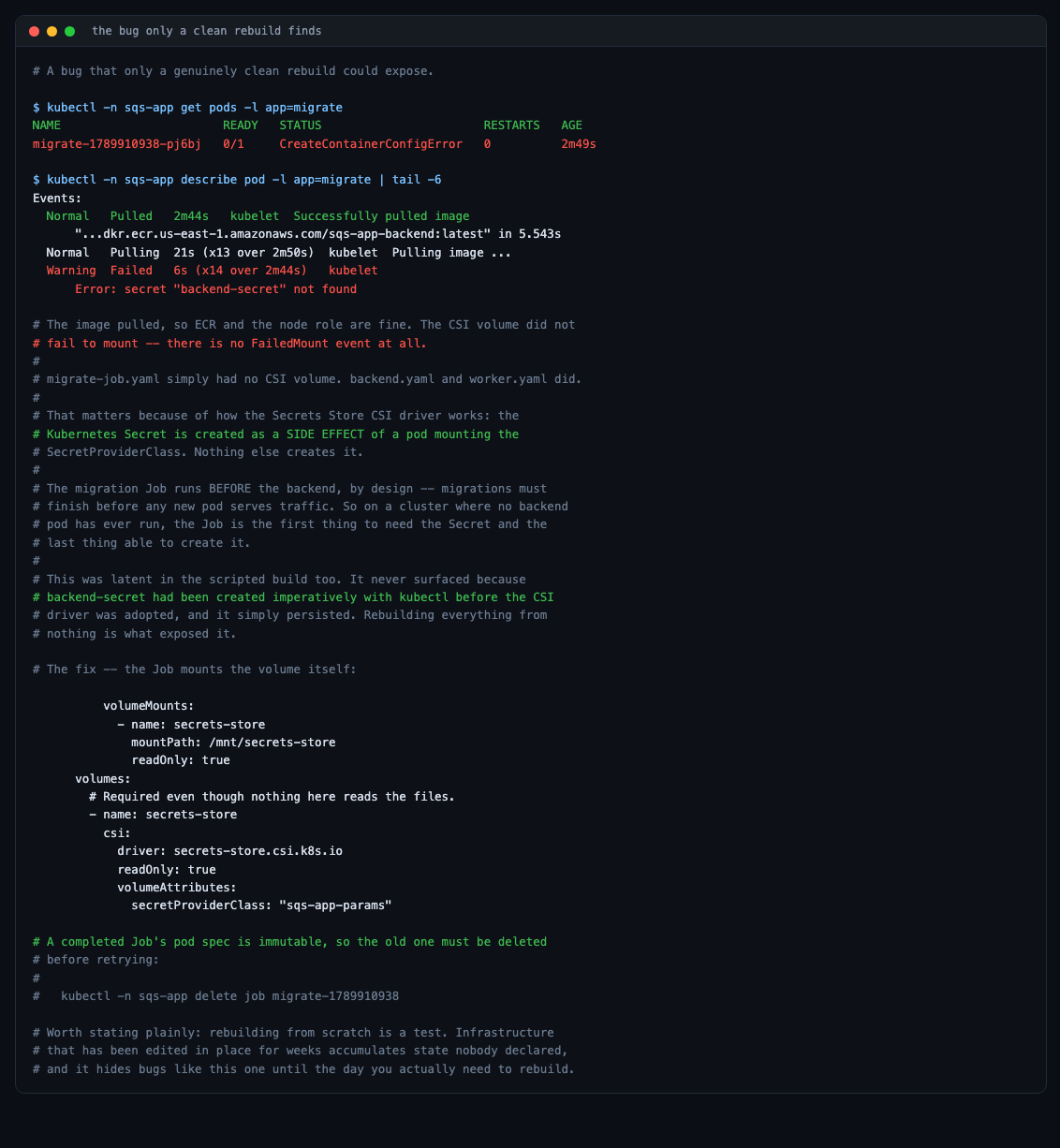
Error: secret "backend-secret" not foundmigrate-job.yaml had no CSI volume mount. backend.yaml and worker.yaml did.
That matters because of how the Secrets Store CSI driver works: the Kubernetes Secret is created as a side effect of a pod mounting the SecretProviderClass. Nothing else creates it.
The migration Job runs before the backend, by design — migrations must finish before any new pod serves traffic. So on a cluster where no backend pod has ever run, the Job is the first thing to need the Secret and the last thing able to create it.
This was latent in the scripted build too. It never surfaced because backend-secret had been created imperatively with kubectl before the CSI driver was adopted, and it simply persisted, unquestioned, for weeks.
      volumes:
        # Required even though nothing here reads the files. The driver only
        # syncs backend-secret while a pod mounts it, and this Job runs before
        # the backend exists.
        - name: secrets-store
          csi:
            driver: secrets-store.csi.k8s.io
            readOnly: true
            volumeAttributes:
              secretProviderClass: "sqs-app-params"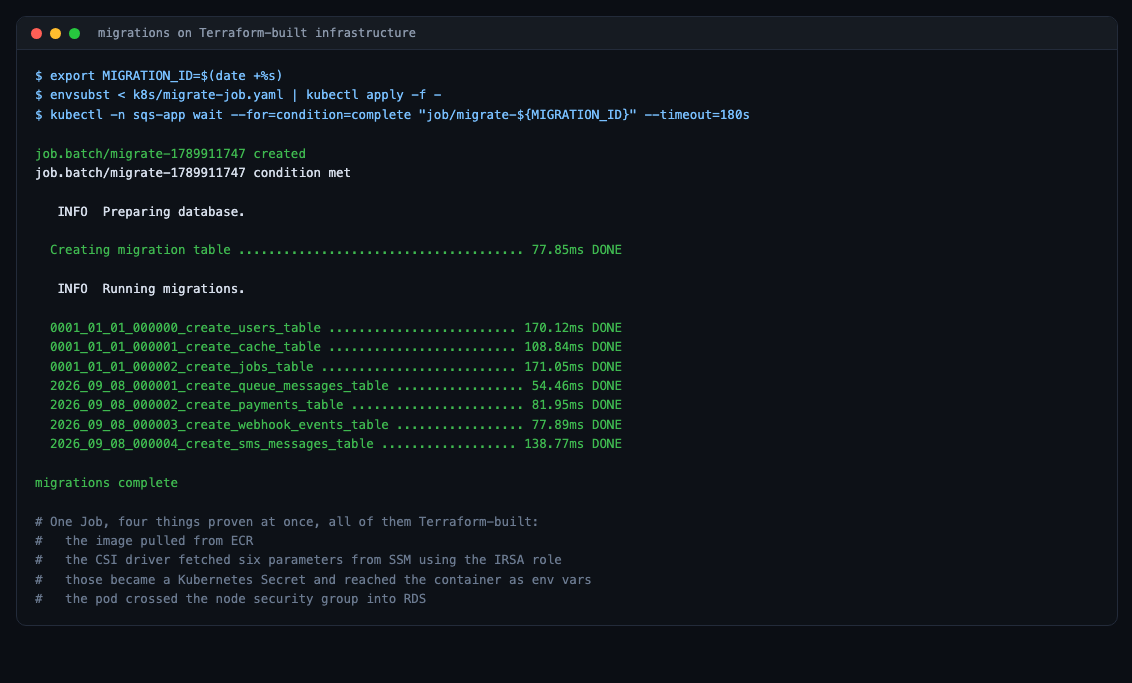
One Job, four things proven at once — the image pulled from ECR, the CSI driver fetched six parameters from SSM using the IRSA role, those became a Kubernetes Secret and reached the container, and the pod crossed the node security group into RDS. All of it Terraform-built.
A bonus: watching the security model work
While reconnecting the Stripe webhook, a ping arrived from a different Stripe sandbox — one that had nothing to do with this application.
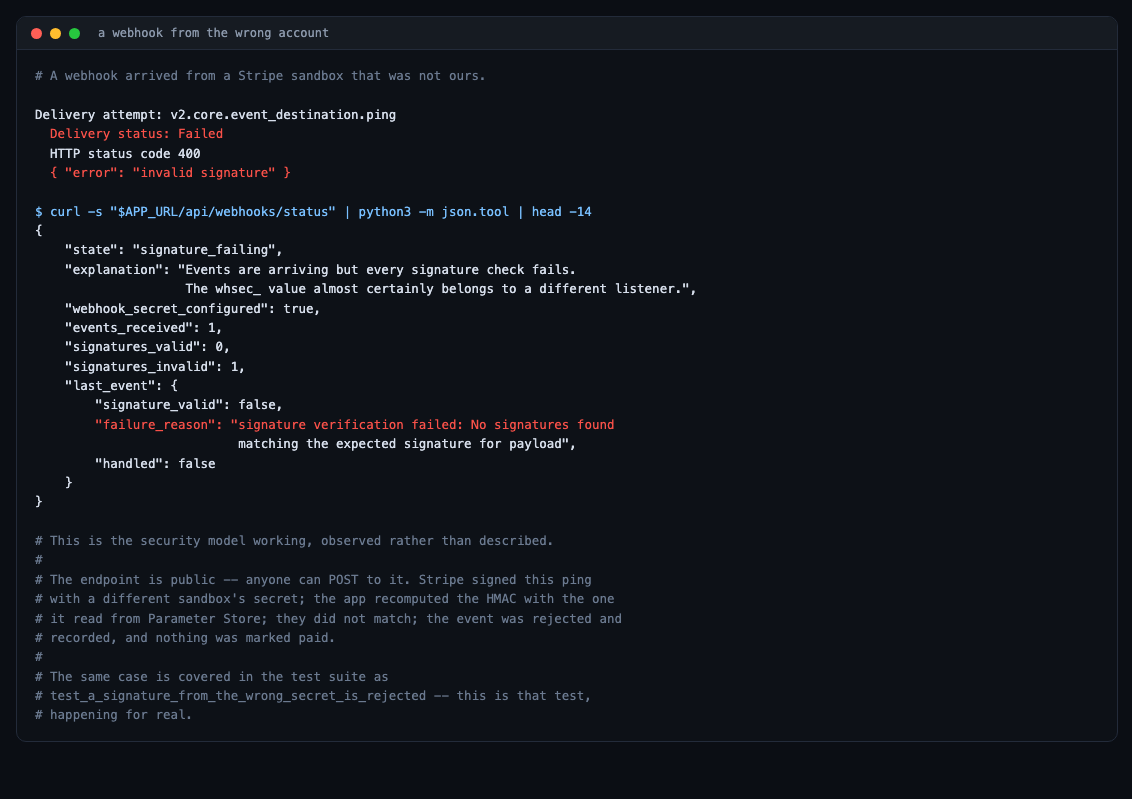
HTTP 400
{ "error": "invalid signature" }
The endpoint is public; anyone can POST to it. Stripe signed that ping with a different account’s secret, the app recomputed the HMAC with the one it read from Parameter Store, they did not match, and the event was rejected and recorded without marking anything paid.
That is test_a_signature_from_the_wrong_secret_is_rejected from the test suite, happening for real.
Tearing it down
Reverse order, and the first step is not Terraform:
kubectl delete -f k8s/ingress.yaml --ignore-not-foundThe load balancer is created by the controller, so Terraform does not know it exists. Its network interfaces block subnet deletion, and terraform destroy on the network layer would hang and then fail. Wait for it to actually go:
for i in $(seq 1 30); do
  left=$(aws elbv2 describe-load-balancers --region us-east-1 \
    --query "LoadBalancers[?LoadBalancerName=='sqs-app-alb'].LoadBalancerArn" --output text)
  [ -z "$left" ] && { echo "ALB gone"; break; }
  sleep 10
done
Then:
cd terraform-version/06-platform && terraform destroy -auto-approve
cd ../05-database && terraform destroy -auto-approve
cd ../04-cluster  && terraform destroy -auto-approve
cd ../03-network  && terraform destroy -auto-approve
01-state and 02-persistent are never destroyed. They hold the registry, the queue and all six SSM parameters — which is precisely what makes the next rebuild cheap, and what keeps APP_KEY alive across it.
The OIDC provider there carries prevent_destroy, because it is account-wide and shared with other projects.
What this actually bought
A rebuild is now a test. That is the headline. Infrastructure edited in place for weeks accumulates state nobody declared — a Secret created once by hand, a security group that happened to be attached to the right thing. Those are invisible until the day you genuinely need to rebuild, which is usually the worst possible day.
Every decision is now reviewable. map_public_ip_on_launch = true is a line in a file with a comment saying why. Previously it was something eksctl did.
Cost decisions are explicit. No NAT gateway, spot instances, no KMS key, no log group — each one a line, each one with a reason.
What it did not buy
It is not faster. eksctl create cluster took 15 minutes; so does terraform apply. AWS provisions a control plane at its own pace.
It is not simpler. Six root modules, terraform_remote_state plumbing, a provider chicken-and-egg to design around, and a CRD that cannot be managed in the same module that installs it. The shell script version was shorter.
It still needs kubectl. Three manifests and a service account annotation sit outside Terraform for a plan-time reason that no amount of restructuring removes.
The trade is honest: more machinery, in exchange for a system that can be destroyed and rebuilt with confidence. If you never rebuild, you do not need it. The moment you do, you find out what your scripts were quietly depending on — which, in this case, was three things nobody had written down.
Be the first to comment