
Push to deploy: GitHub Actions to EKS with no AWS keys stored anywhere
This is the third post. Part one deployed an app to EKS by hand. Part two moved its secrets to Parameter Store. Both still required someone to run kubectl from a laptop.
This post removes that. Push to main, and the cluster updates itself.
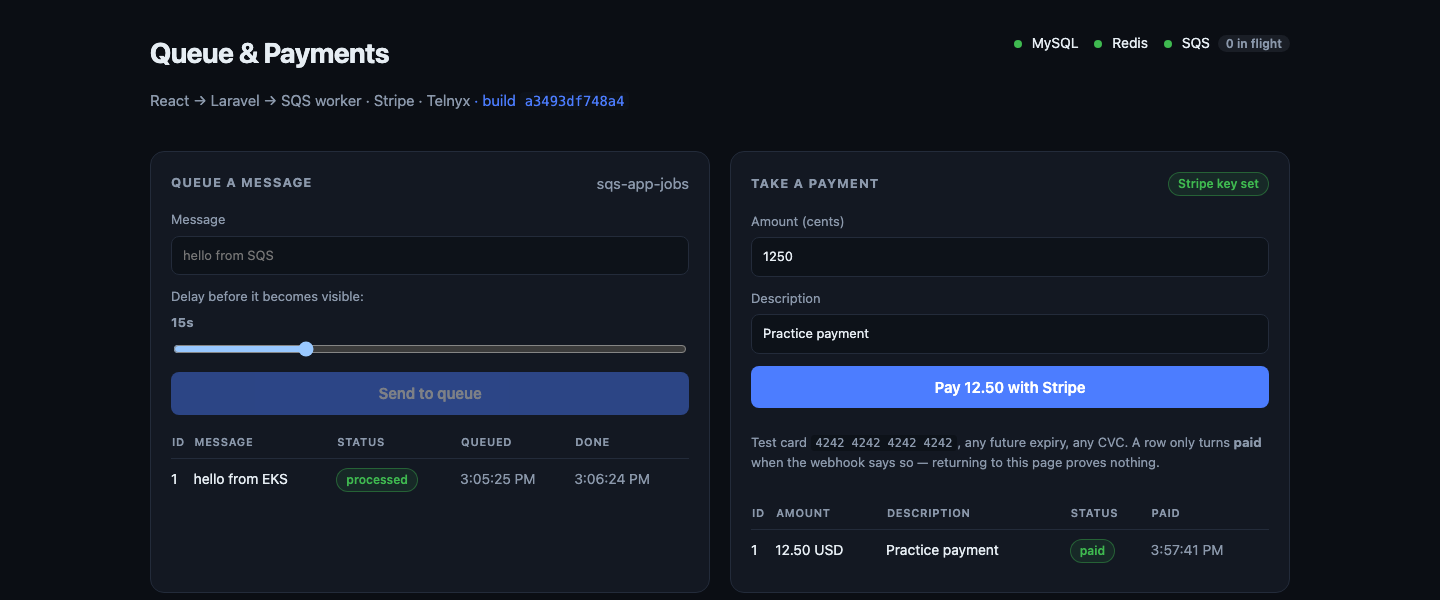
Look at the header: build a3493df748a4. That is the commit SHA of the code running in production, surfaced in the UI. By the end of this post you will know why that matters more than it looks.
Why not just store an access key?
The obvious approach is to create an AWS access key and paste it into GitHub Secrets. It works immediately. It is also the thing you will regret.
That key is long-lived, works from anywhere on earth, and if it leaks — in a log, a fork, a screenshot — you may not find out for months.
OIDC removes the key entirely:
- GitHub mints a short-lived signed token for each workflow run. The token states facts: which repository, which branch, which workflow.
- AWS is configured to trust tokens signed by GitHub — but only when those facts match your repository.
- AWS returns temporary credentials valid for one hour.
Nothing is stored. A stolen token is useless within the hour, and useless from any other repository even before that.
It is the same mechanism as IRSA from part one, pointed at GitHub instead of at your cluster.
Step 1 — Register GitHub as an identity provider
Once per AWS account:
aws iam create-open-id-connect-provider \
  --url https://token.actions.githubusercontent.com \
  --client-id-list sts.amazonaws.com \
  --thumbprint-list 6938fd4d98bab03faadb97b34396831e3780aea1
EntityAlreadyExists means another project already created it — fine, it is account-wide. But check its audience list, because your --client-id-list is silently discarded when the provider already exists:
aws iam get-open-id-connect-provider \
  --open-id-connect-provider-arn \
  "arn:aws:iam::ACCOUNT_ID:oidc-provider/token.actions.githubusercontent.com"
sts.amazonaws.com must be in ClientIDList.
Step 2 — The role, and the condition that is the entire security model
{
  "Version": "2012-10-17",
  "Statement": [
    {
      "Effect": "Allow",
      "Principal": {
        "Federated": "arn:aws:iam::ACCOUNT_ID:oidc-provider/token.actions.githubusercontent.com"
      },
      "Action": "sts:AssumeRoleWithWebIdentity",
      "Condition": {
        "StringEquals": {
          "token.actions.githubusercontent.com:aud": "sts.amazonaws.com"
        },
        "StringLike": {
          "token.actions.githubusercontent.com:sub": [
            "repo:GITHUB_REPO:*",
            "repo:GITHUB_REPO_IDS:*"
          ]
        }
      }
    }
  ]
}
Read the Condition carefully:
audmust equalsts.amazonaws.com— the token was minted for AWS.submust match your repository — the token came from your repo.
Leaving sub as * would let any repository on GitHub assume your role. That is not theoretical; it is a well-known way people get compromised.
Note the two operators differ. aud uses StringEquals, an exact match. sub uses StringLike, which is the only operator where acts as a wildcard. Writing StringEquals with a in the value compares a literal asterisk and silently never matches.
Step 3 — The trap that eats an afternoon
Every tutorial says the subject looks like:
repo:owner/name:ref:refs/heads/mainHere is what the token actually contained:
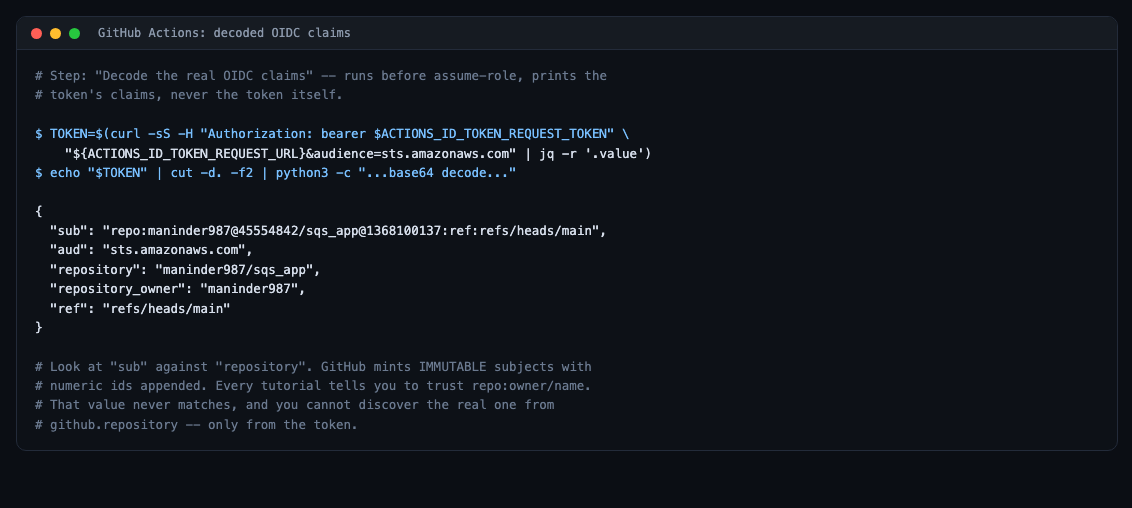
repo:maninder987@45554842/sqs_app@1368100137:ref:refs/heads/mainGitHub mints immutable subject claims — the owner and repository names carry their numeric database ids appended. It is genuinely good design: the claim survives a rename, and nobody can hijack your trust policy by registering your old username after you change it.
But a trust policy written the standard way never matches. And the failure is maximally unhelpful:
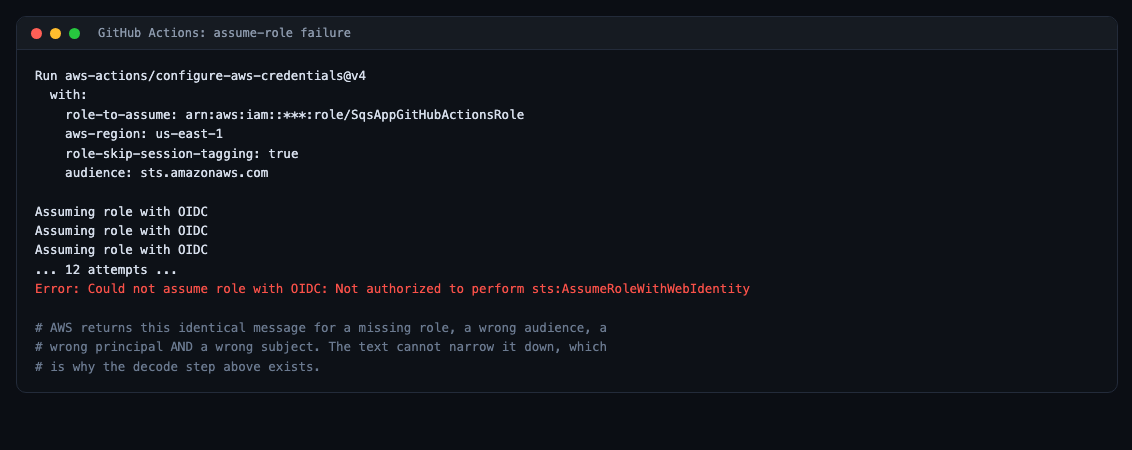
AWS returns the same message for a missing role, a wrong audience, a wrong principal and a wrong subject. The error text cannot narrow it down.
Worse: ${{ github.repository }} still prints the plain owner/name. So you can print the repository in your workflow, compare it against your trust policy, see them match perfectly, and still be wrong.
The only reliable move is to read the token. Add this step before configure-aws-credentials. It prints the claims, never the token:
- name: Decode the real OIDC claims
  run: |
    TOKEN=$(curl -sS \
      -H "Authorization: bearer $ACTIONS_ID_TOKEN_REQUEST_TOKEN" \
      "${ACTIONS_ID_TOKEN_REQUEST_URL}&audience=sts.amazonaws.com" \
      | jq -r '.value')
    echo "$TOKEN" | cut -d. -f2 | python3 -c "import sys,base64,json;\
d=sys.stdin.read().strip();d+='='*(-len(d)%4);\
print(json.dumps(json.loads(base64.urlsafe_b64decode(d)),indent=2))"
Take the owner@id/name@id portion, put it in the trust policy, and update the role. No push needed — IAM changes apply immediately:
aws iam update-assume-role-policy --role-name SqsAppGitHubActionsRole \
  --policy-document file:///tmp/trust.json
Generalised lesson: when an OIDC assume-role fails and every piece of config inspects as correct, stop theorising and decode the token.
Step 4 — What the role may do
Separate from who may assume the role is what it may do. Push to two repositories, read cluster info, nothing else:
{
  "Version": "2012-10-17",
  "Statement": [
    {
      "Sid": "EcrAuth",
      "Effect": "Allow",
      "Action": "ecr:GetAuthorizationToken",
      "Resource": "*"
    },
    {
      "Sid": "EcrPush",
      "Effect": "Allow",
      "Action": [
        "ecr:BatchCheckLayerAvailability", "ecr:CompleteLayerUpload",
        "ecr:InitiateLayerUpload", "ecr:PutImage", "ecr:UploadLayerPart",
        "ecr:BatchGetImage", "ecr:GetDownloadUrlForLayer", "ecr:DescribeImages"
      ],
      "Resource": [
        "arn:aws:ecr:REGION:ACCOUNT_ID:repository/sqs-app-backend",
        "arn:aws:ecr:REGION:ACCOUNT_ID:repository/sqs-app-frontend"
      ]
    },
    {
      "Sid": "ReadClusterInfoOnly",
      "Effect": "Allow",
      "Action": ["eks:DescribeCluster", "eks:ListClusters"],
      "Resource": "*"
    }
  ]
}
Step 5 — The part everybody forgets
IAM permission to describe a cluster is not permission to deploy into it. Kubernetes has its own authorization, and EKS bridges the two with access entries:
aws eks create-access-entry --cluster-name sqs-app-cluster \
  --principal-arn "$GHA_ROLE_ARN" --type STANDARD

aws eks associate-access-policy --cluster-name sqs-app-cluster \
  --principal-arn "$GHA_ROLE_ARN" \
  --access-scope '{"type":"namespace","namespaces":["sqs-app"]}' \
  --policy-arn arn:aws:eks::aws:cluster-access-policy/AmazonEKSEditPolicy
The scope limits the role to one namespace — a compromised CI token cannot touch kube-system.
Watch that policy ARN. The account segment is the literal string aws (arn:aws:eks::aws:...), not empty. Three colons gives ResourceNotFoundException, which reads as “that policy does not exist” rather than “you typed it wrong”.
Step 6 — The workflow
name: Build and deploy to EKS

on:
  push:
    branches: [main]
    paths:
      - 'www/'
      - 'k8s/'
      - '.github/workflows/deploy.yml'
  workflow_dispatch:

# Without id-token: write there is no OIDC token to mint and the whole scheme
# fails. A job-level permissions block REPLACES this one -- a classic way to
# lose it by accident.
permissions:
  id-token: write
  contents: read

concurrency:
  group: deploy-eks
  cancel-in-progress: false
paths means a documentation commit does not trigger a deploy. It also means an empty commit will not — worth knowing when you are trying to force a run. Use workflow_dispatch instead.
concurrency with cancel-in-progress: false queues deploys rather than running two at once against the same cluster.
Job 1: build
jobs:
  build:
    runs-on: ubuntu-latest
    outputs:
      image_tag: ${{ steps.meta.outputs.tag }}
      registry: ${{ steps.login-ecr.outputs.registry }}
    steps:
      - uses: actions/checkout@v4

      - name: Derive image tag
        id: meta
        # Commit SHA rather than 'latest': every deploy is uniquely addressable
        # and rolling back is just pointing at an older tag.
        run: echo "tag=${GITHUB_SHA::12}" >> "$GITHUB_OUTPUT"

      - uses: aws-actions/configure-aws-credentials@v4
        with:
          role-to-assume: ${{ vars.AWS_ROLE_ARN }}
          aws-region: ${{ env.AWS_REGION }}
          role-skip-session-tagging: true

      - name: Log in to Amazon ECR
        id: login-ecr
        uses: aws-actions/amazon-ecr-login@v2

      - uses: docker/setup-buildx-action@v3

      - name: Build and push backend
        uses: docker/build-push-action@v6
        with:
          context: ./www/backend
          push: true
          # EKS nodes are x86_64. Building only that platform keeps CI fast and
          # avoids the 'exec format error' an arm64 image produces.
          platforms: linux/amd64
          tags: |
            ${{ steps.login-ecr.outputs.registry }}/${{ env.BACKEND_REPO }}:${{ steps.meta.outputs.tag }}
            ${{ steps.login-ecr.outputs.registry }}/${{ env.BACKEND_REPO }}:latest
          cache-from: type=gha,scope=backend
cache-to: type=gha,scope=backend,mode=maxcache-from/cache-to reuse Docker layers between runs, which takes the backend build from minutes to seconds when only application code changed.
Job 2: deploy
  deploy:
    runs-on: ubuntu-latest
    needs: build
    env:
      ECR_REGISTRY: ${{ needs.build.outputs.registry }}
      IMAGE_TAG: ${{ needs.build.outputs.image_tag }}
    steps:
      - uses: actions/checkout@v4

      - uses: aws-actions/configure-aws-credentials@v4
        with:
          role-to-assume: ${{ vars.AWS_ROLE_ARN }}
          aws-region: ${{ env.AWS_REGION }}
          role-skip-session-tagging: true

      # The cluster is torn down most nights to save money. A push with no
      # cluster should leave the images built and stop cleanly, not fail red.
      - name: Is the cluster up?
        id: cluster
        run: |
          if aws eks describe-cluster --name "$CLUSTER_NAME" \
               --region "$AWS_REGION" >/dev/null 2>&1; then
            echo "up=true" >> "$GITHUB_OUTPUT"
          else
            echo "up=false" >> "$GITHUB_OUTPUT"
            echo "::notice::Cluster does not exist. Images pushed; run ./deploy/up.sh."
          fi

      - name: Write kubeconfig
        if: steps.cluster.outputs.up == 'true'
        run: aws eks update-kubeconfig --name "$CLUSTER_NAME" --region "$AWS_REGION"
That cluster check matters for a cost-conscious setup. Pushing at 9pm, after the cluster is gone, should build images and stop — not fail red and train you to ignore red builds.
Migrations before pods
      - name: Run database migrations
        if: steps.cluster.outputs.up == 'true'
        run: |
          export MIGRATION_ID="${IMAGE_TAG}"
          envsubst < k8s/migrate-job.yaml | kubectl apply -f -
          JOB="job/migrate-${MIGRATION_ID}"
          for i in $(seq 1 60); do
            OK=$(kubectl -n "$K8S_NAMESPACE" get "$JOB" -o jsonpath='{.status.succeeded}')
            BAD=$(kubectl -n "$K8S_NAMESPACE" get "$JOB" -o jsonpath='{.status.failed}')
            if [ "${OK:-0}" -ge 1 ]; then
              kubectl -n "$K8S_NAMESPACE" logs "$JOB"; exit 0
            fi
            if [ "${BAD:-0}" -ge 3 ]; then
              echo "::error::migration job failed"
              kubectl -n "$K8S_NAMESPACE" logs "$JOB" --tail=100 || true
              exit 1
            fi
            sleep 5
          done
          echo "::error::migration job did not finish in 5 minutes"
          exit 1
Migrations finish before any new pod serves traffic. If this fails the workflow stops and the old pods keep running — a failed deploy leaves you with the previous version, not a half-migrated one.
Rollout and smoke test
      - name: Deploy
        if: steps.cluster.outputs.up == 'true'
        run: |
          envsubst < k8s/backend.yaml  | kubectl apply -f -
          envsubst < k8s/worker.yaml   | kubectl apply -f -
          envsubst < k8s/frontend.yaml | kubectl apply -f -
          kubectl apply -f k8s/ingress.yaml

      - name: Wait for rollouts
        if: steps.cluster.outputs.up == 'true'
        run: |
          kubectl -n "$K8S_NAMESPACE" rollout status deployment/backend  --timeout=300s
          kubectl -n "$K8S_NAMESPACE" rollout status deployment/worker   --timeout=300s
          kubectl -n "$K8S_NAMESPACE" rollout status deployment/frontend --timeout=300s

      - name: Smoke test through the load balancer
        if: steps.cluster.outputs.up == 'true'
        # Retries because the load balancer hostname resolves in DNS a minute
        # or two before its targets pass health checks.
        run: |
          HOST=$(kubectl -n "$K8S_NAMESPACE" get ingress sqs-app \
            -o jsonpath='{.status.loadBalancer.ingress[0].hostname}')
          for i in $(seq 1 30); do
            if curl -fsS --max-time 5 "http://${HOST}/api/health"; then
              echo; echo "smoke test passed"; exit 0
            fi
            sleep 10
          done
          echo "::error::load balancer never returned a healthy /api/health"
          exit 1
The retry loop is not defensive padding. The load balancer gets its DNS name a couple of minutes before its targets pass health checks, so a single check would fail a perfectly good deployment.
Step 6 — Tests first, or nothing ships
Before a single image is built, the pipeline runs the test suite. If it fails, build never starts and deploy never starts — so a broken commit cannot reach the cluster, and the previous version keeps serving.
That gate is one line. GitHub Actions runs jobs in parallel by default; needs makes them sequential:
jobs:
  test:
    name: Tests
    runs-on: ubuntu-latest
    steps:
      - uses: actions/checkout@v4

      - uses: shivammathur/setup-php@v2
        with:
          php-version: '8.4'
          extensions: pdo_sqlite, bcmath, mbstring
          coverage: none

      - name: Cache composer packages
        uses: actions/cache@v4
        with:
          path: www/backend/vendor
          key: composer-${{ hashFiles('www/backend/composer.lock') }}

      - name: Install dependencies
        working-directory: www/backend
        run: composer install --prefer-dist --no-interaction --no-progress

      - name: PHP tests
        working-directory: www/backend
        run: php artisan test

      - uses: actions/setup-node@v4
        with:
          node-version: '20'
          cache: npm
          cache-dependency-path: www/frontend/package-lock.json

      - name: Typecheck the frontend
        working-directory: www/frontend
        run: |
          npm ci
          npx tsc -b

  build:
    needs: test          # <- nothing builds unless tests pass
    ...

  deploy:
    needs: build         # <- nothing deploys unless the build succeeds
The result is a chain: test → build → deploy. Each stage is a gate.
The tests need no database, no Redis, and no Stripe
This matters more than it sounds. A test job that needs a MySQL service container, a Redis container and network access to Stripe is slow, flaky, and eventually gets skipped. Ours runs in about a second on a clean runner.
phpunit.xml swaps the infrastructure for in-memory equivalents:
<php>
    <env name="APP_ENV" value="testing"/>
    <env name="DB_CONNECTION" value="sqlite"/>
    <env name="DB_DATABASE" value=":memory:"/>
    <env name="CACHE_STORE" value="array"/>
    <env name="SESSION_DRIVER" value="array"/>
    <env name="QUEUE_CONNECTION" value="sync"/>

    <!-- Deterministic values so tests never touch a real service: a fixed
         webhook secret lets us sign payloads ourselves, and the log SMS
         driver records instead of sending. -->
    <env name="STRIPE_SECRET" value="sk_test_fake_for_tests"/>
    <env name="STRIPE_WEBHOOK_SECRET" value="whsec_test_secret_for_signing"/>
    <env name="SMS_DRIVER" value="log"/>
    <env name="APP_VERSION" value="test"/>
</php>
SQLite in memory means each test starts from an empty schema. The log SMS driver means no message is ever sent. And a fixed webhook secret is what makes the next part possible.
Testing the webhook without mocking the thing that matters
The obvious way to test a Stripe webhook is to mock the verifier. That is also useless: a mocked verifier still passes if you delete the verification entirely.
So the tests sign payloads the way Stripe does — HMAC-SHA256 over "{timestamp}.{payload}" with the endpoint secret:
protected function stripeSignature(string $payload, ?string $secret = null, ?int $timestamp = null): string
{
    $secret ??= config('services.stripe.webhook_secret');
    $timestamp ??= time();

    $signature = hash_hmac('sha256', "{$timestamp}.{$payload}", $secret);

    return "t={$timestamp},v1={$signature}";
}
Which lets the suite describe the security boundary rather than the happy path:
public function test_a_signature_from_the_wrong_secret_is_rejected(): void
{
    $payment = $this->pendingPayment();
    $payload = $this->checkoutCompletedPayload($payment->stripe_session_id);

    // Signed correctly, but by someone who does not know our secret.
    $forged = $this->stripeSignature($payload, 'whsec_not_our_secret');

    $this->call('POST', '/api/webhooks/stripe', [], [], [],
        ['HTTP_STRIPE_SIGNATURE' => $forged, 'CONTENT_TYPE' => 'application/json'],
        $payload)
        ->assertStatus(400);

    $this->assertSame('pending', $payment->refresh()->status);
}

public function test_a_replayed_event_is_ignored(): void
{
    // Stripe retries on any non-2xx, so the same event id can arrive more
    // than once. Fulfilling twice would be a real bug.
    $payment = $this->pendingPayment();
    $payload = $this->checkoutCompletedPayload($payment->stripe_session_id);
    $signature = $this->stripeSignature($payload);

    $send = fn () => $this->call('POST', '/api/webhooks/stripe', [], [], [],
        ['HTTP_STRIPE_SIGNATURE' => $signature, 'CONTENT_TYPE' => 'application/json'],
        $payload);

    $send()->assertOk();
    $send()->assertOk()->assertJson(['status' => 'duplicate ignored']);

    // One SMS, not two.
    $this->assertSame(1, SmsMessage::where('payment_id', $payment->id)->count());
}
Six cases cover the boundary: valid signature, missing header, wrong secret, tampered payload, replayed event, unknown session. Delete the verification and four of them fail immediately.
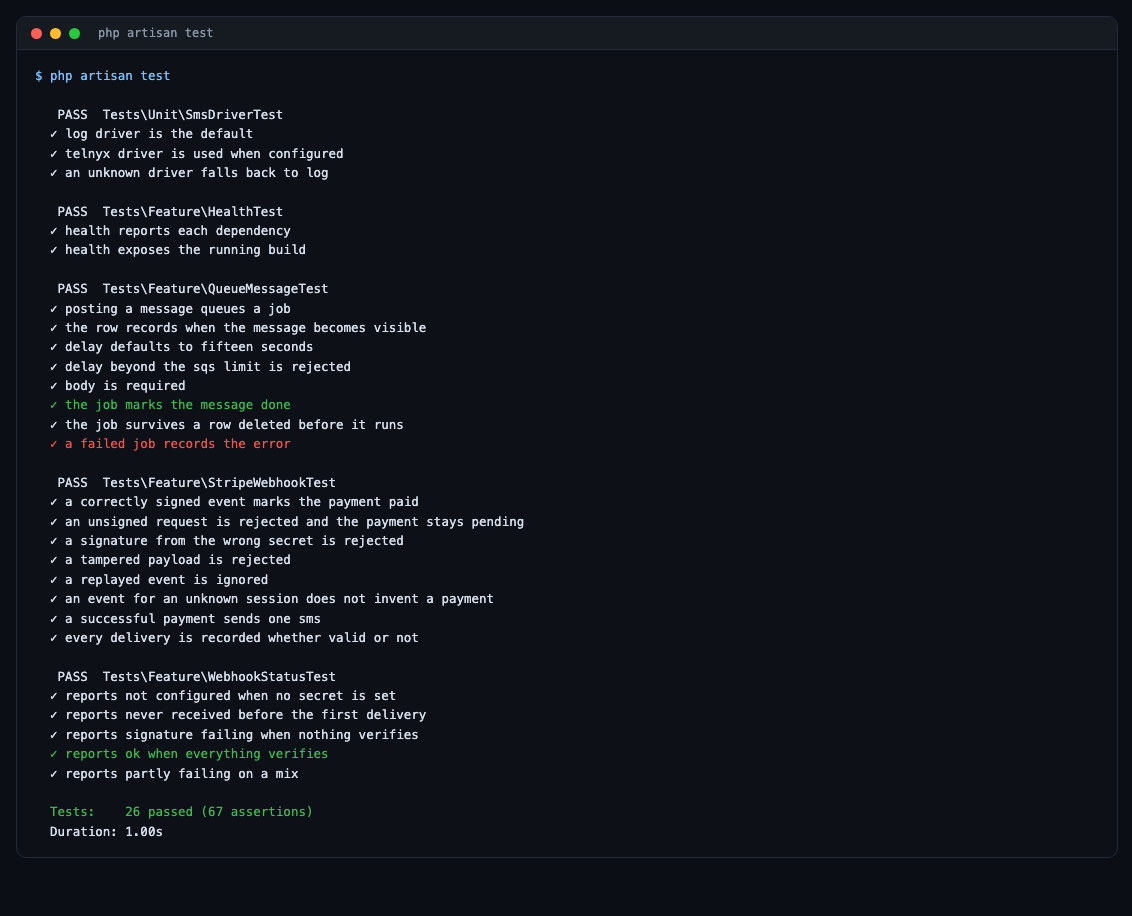
One of these tests found a bug in itself
Worth admitting, because it is the point of running them. The tampering test originally mutated the payload with str_replace('1250', '1', $payload) — and 1250 does not appear anywhere in a checkout.session.completed event. The body was unchanged, the signature was still valid, and the endpoint correctly returned 200 while the test expected 400.
The fix was to tamper with a field that exists, plus an assertion that the tampering actually happened:
$tampered = str_replace('pi_test_123', 'pi_attacker_999', $payload);
$this->assertNotSame($payload, $tampered);
A test that cannot fail is worse than no test, because it looks like coverage.
What the gate actually buys
- A commit that breaks the webhook never reaches the cluster.
- A TypeScript error fails in 40 seconds rather than after a five-minute image build.
needs:makes the ordering explicit, so nobody has to remember it.- Migrations still run before pods roll, so even a passing build cannot leave a half-migrated database.
Step 7 — Repository configuration
In Settings → Secrets and variables → Actions, on the Variables tab:
| Name | Value |
|---|---|
AWS_ROLE_ARN | the role ARN |
AWS_REGION | us-east-1 |
CLUSTER_NAME | sqs-app-cluster |
K8S_NAMESPACE | sqs-app |
FRONTEND_REPO | sqs-app-frontend |
BACKEND_REPO | sqs-app-backend |
SQS_QUEUE_NAME | sqs-app-jobs |
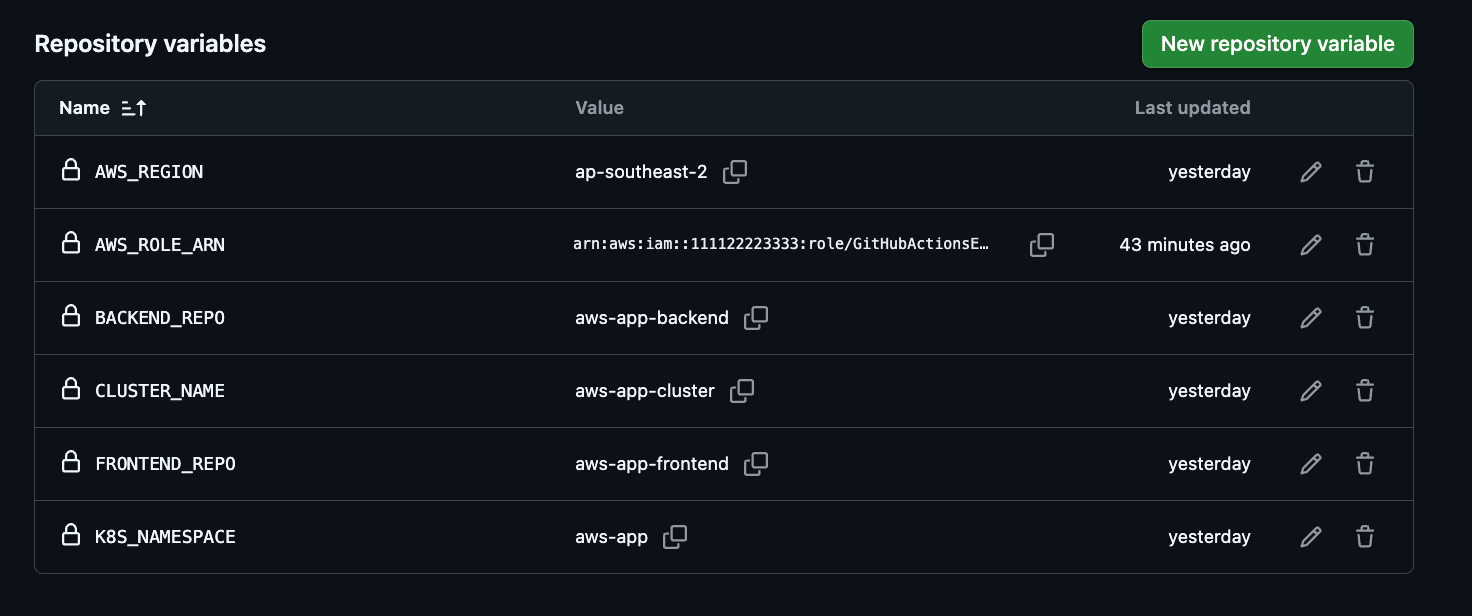
A role ARN is an identifier, not a credential. Your security comes from the trust policy, not from hiding the ARN. Storing it as a variable rather than a secret means it appears in logs instead of being masked as * — which makes debugging enormously easier. We started with it as a secret and could not tell whether it had a typo, a trailing space, or was set at all.
Note also: these live in your repository’s settings, not your account settings. The account-level page looks similar, sits at a nearly identical URL, and has none of these options.
The second failure, which was progress
After OIDC worked, the run failed again:
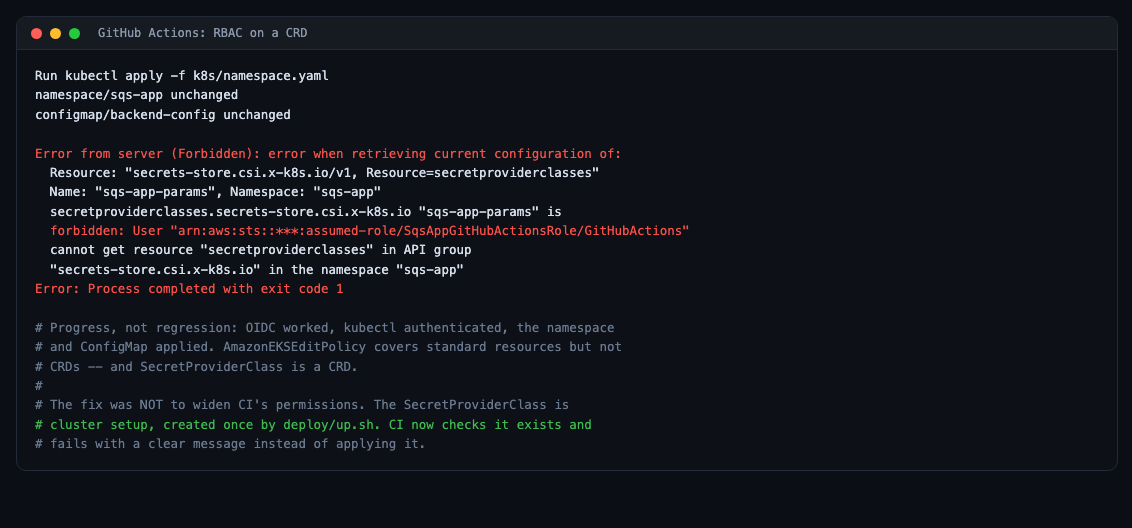
Read it closely and it is good news: the role assumed successfully, kubectl authenticated, the namespace and ConfigMap applied. The failure is three steps further along.
AmazonEKSEditPolicy covers standard Kubernetes resources but not custom resource definitions — and SecretProviderClass from part two is a CRD.
The fix was not to widen CI’s permissions. The SecretProviderClass is cluster setup, created once by the provisioning script and unchanged between deploys. Giving CI write access to the object that controls secret mounting would meaningfully widen what a leaked CI token could do, in exchange for re-applying something identical every time.
So CI checks it instead:
          if ! kubectl -n "$K8S_NAMESPACE" get secretproviderclass sqs-app-params >/dev/null 2>&1; then
            echo "::error::SecretProviderClass is missing. Run ./deploy/up.sh."
            exit 1
          fi
Which needs read access to that one CRD, granted as narrowly as possible:
apiVersion: rbac.authorization.k8s.io/v1
kind: Role
metadata:
  name: ci-read-secretproviderclass
  namespace: sqs-app
rules:
  - apiGroups: ["secrets-store.csi.x-k8s.io"]
    resources: ["secretproviderclasses"]
    verbs: ["get", "list"]
---
apiVersion: rbac.authorization.k8s.io/v1
kind: RoleBinding
metadata:
  name: ci-read-secretproviderclass
  namespace: sqs-app
subjects:
  - kind: Group
    name: sqs-app-ci
    apiGroup: rbac.authorization.k8s.io
roleRef:
  kind: Role
  name: ci-read-secretproviderclass
  apiGroup: rbac.authorization.k8s.io
Bound to a group rather than the assumed-role username, because that username contains the session name and would break if it ever changed:
aws eks update-access-entry --cluster-name sqs-app-cluster \
  --principal-arn "$GHA_ROLE_ARN" --kubernetes-groups sqs-app-ci
Putting the version on screen
A green checkmark tells you the pipeline ran. It does not tell you what is serving traffic right now.
# k8s/backend.yaml
          env:
            # The running image tag, surfaced through /api/health so the UI can
            # show exactly which build is live. CI tags both images with the
            # same commit SHA, so this identifies the whole deploy.
            - name: APP_VERSION
              value: "${IMAGE_TAG}"
// HealthController
'version' => env('APP_VERSION', 'dev'),And in the header:
React → Laravel → SQS worker · Stripe · Telnyx · build a3493df748a4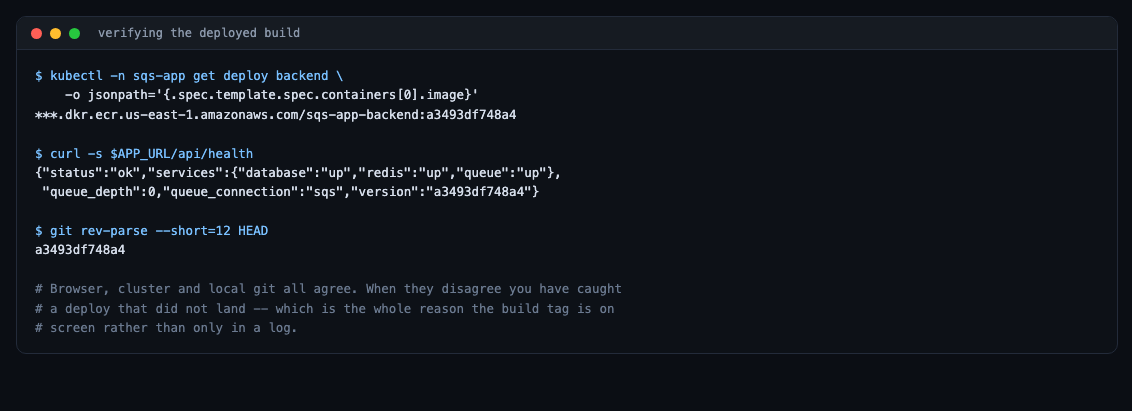
Three sources agree: the browser, the cluster, and local git. When they disagree, you have caught a deploy that did not land — which is the entire reason to put the version on screen rather than only in a log.
What this bought
- No AWS key exists anywhere. Not in GitHub, not in the cluster, not in the image.
- CI is scoped to one namespace and to deploying applications — not to configuring the cluster.
- A failed migration leaves the previous version running.
- A push with no cluster builds images and stops, rather than failing red.
- The running version is visible in the UI.
The five that cost real time, across all three posts
- GitHub’s immutable OIDC subjects — every piece of config looks correct and the assume-role still fails.
- The CSI driver chart does not set
tokenRequests— the mount fails before IAM is ever contacted. AmazonEKSEditPolicydoes not cover CRDs — and the right fix was less permission, not more.- An extended-support Kubernetes version costs six times more — visible only on the invoice.
--platform linux/amd64on an Apple Silicon machine, or pods die withexec format error.
Every one of them produced an error message pointing somewhere other than the cause. That is the real lesson: in this stack, read the error as a starting point, not as a diagnosis.
Be the first to comment