
How to Install and Configure MariaDB on Ubuntu 24.04 | CloudyWP
📅 Last updated: 21 February 2026
Here you can see the file you can name it anything you like. now lets see the content of this file. starting with “#!/bin/bash” this is required to make a bash file.
#!/bin/bash

# Ensure the script is run as root
if [ "$EUID" -ne 0 ]; then
  echo "Please run as root"
  exit
fi

# Update package list and install MariaDB Server
echo "Updating package list..."
apt update -y

echo "Installing MariaDB Server..."
apt install -y mariadb-server

# Start and enable MariaDB service
systemctl start mariadb
systemctl enable mariadb

# Secure MariaDB installation (non-interactive)
mysql_secure_installation <<EOF
n
y
y
y
y
EOF

# Define database, user, and password
DB_NAME="demo_db"
TABLE_NAME="users"
ROOT_PASS="rootpassword"
USER_NAME="demo_user"
USER_PASS="demopassword"

# Create database and table, and insert demo data
mysql -uroot -e "CREATE DATABASE IF NOT EXISTS $DB_NAME;"
mysql -uroot -e "USE $DB_NAME; CREATE TABLE IF NOT EXISTS $TABLE_NAME (
  id INT AUTO_INCREMENT PRIMARY KEY,
  username VARCHAR(50) NOT NULL,
  email VARCHAR(100) NOT NULL,
  created_at TIMESTAMP DEFAULT CURRENT_TIMESTAMP
);"
mysql -uroot -e "USE $DB_NAME; INSERT INTO $TABLE_NAME (username, email) VALUES
  ('john_doe', '[email protected]'),
  ('jane_doe', '[email protected]'),
  ('admin_user', '[email protected]');"

# Output instructions for querying
cat <<EOL
MariaDB has been installed and configured.

To query the database:
1. Access the MariaDB shell:
   sudo mysql -u root

2. Use the database:
   USE $DB_NAME;

3. Query the users table:
   SELECT * FROM $TABLE_NAME;

Database Name: $DB_NAME
Table Name: $TABLE_NAMECode language: PHP (php)
Now as we go further. we are running it as root, see my comment in there. Updating Ubuntu and installing MariaDB. then creating table in database. i have provided this code you can run it after making desired changes.
Make file executable
Quick Answer
To install MariaDB on Ubuntu 24.04, update your system, install the server package, secure it, and create a database with user privileges.
to run bash file you need to make it executable here is how you do it.
chmod +x mariaDb.sh
chmod +x fileName.shCode language: CSS (css)
Running and Installing MariaDB
after all run the file it should do the rest and will give you output as
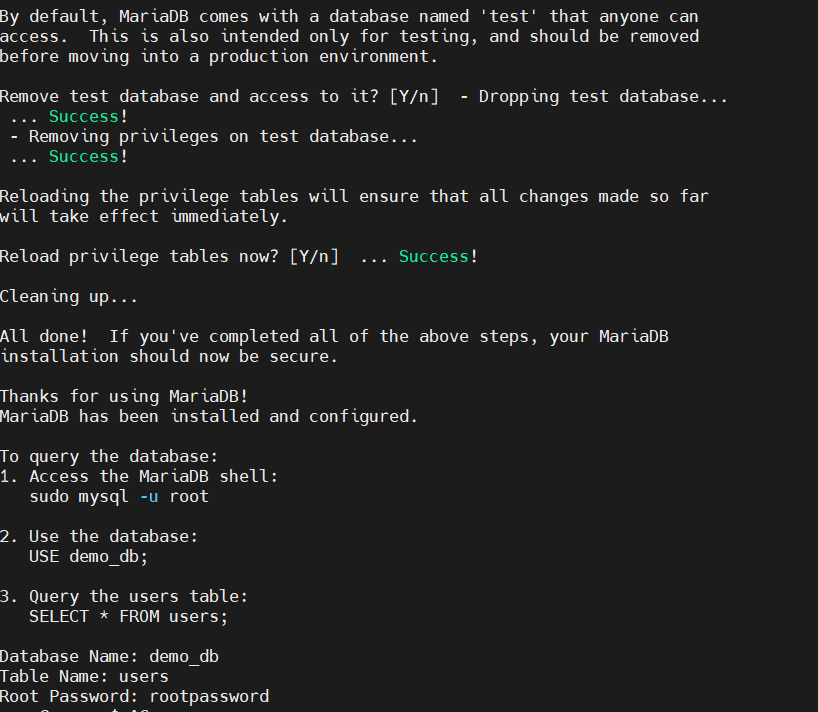
in case you are getting any error check for permissions and for the typo.
Querying data from database.
now it is time to get those users we added in previous script.
there are 3 users check the code above.
here is the code to query
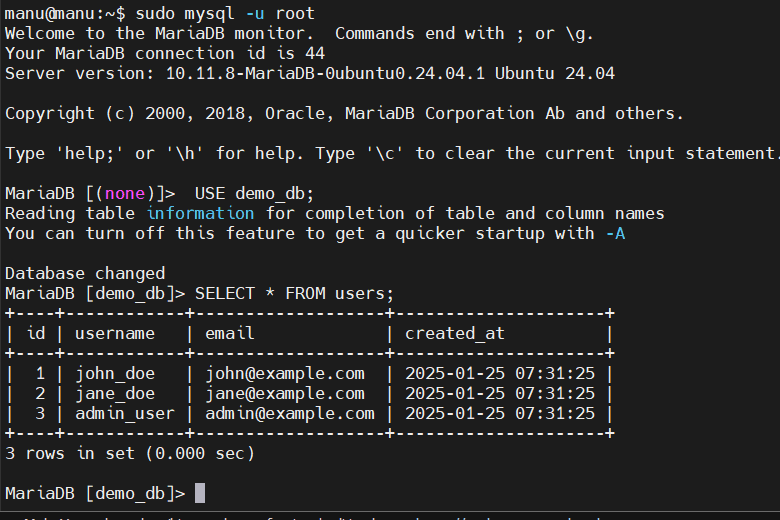
Notice first i got into mariadb command line then i selected the “database” and after all i queried the users.
User privileges
see we are quering as logged in user, but you might want to restrict the access, so that someone can add or update data but cannot delete. so lets add a new user for this.
ok first check current user
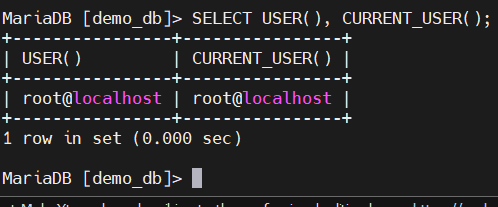
to exit MariaDB shell use command
EXIT;Code language: PHP (php)Create User Using Bash File
#!/bin/bash

# Define variables
DB_NAME="roger_db"
NEW_USER="roger"
NEW_USER_PASS="rogerthat"

# Connect to MariaDB and set permissions
mysql -uroot -e "
CREATE USER IF NOT EXISTS '${NEW_USER}'@'localhost' IDENTIFIED BY '${NEW_USER_PASS}';
GRANT SELECT, UPDATE ON ${DB_NAME}.* TO '${NEW_USER}'@'localhost';
FLUSH PRIVILEGES;
"

echo "User '${NEW_USER}' created with SELECT and UPDATE privileges on database '${DB_NAME}'."
echo "Use the following command to log in as this user:"
echo "mysql -u${NEW_USER} -p"Code language: PHP (php)
Now you can see this file is adding “roger” user.

Now lets login with this user and see how things go

now “roger” has access to db named “roger_db” but not to “demo_db”.
so login in MariaDB as root user and provide access to roger.
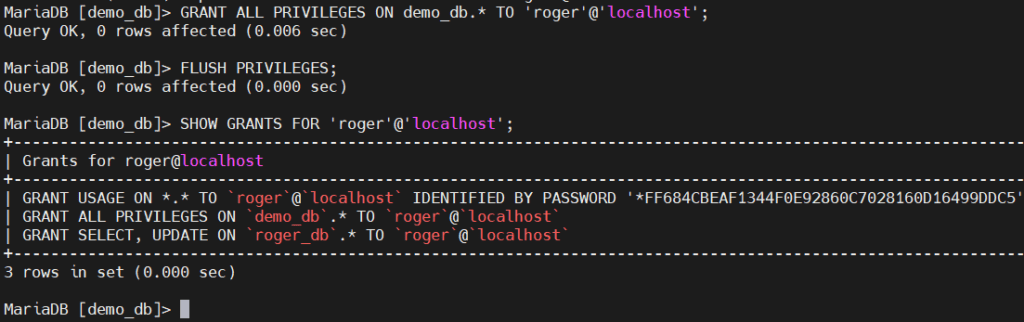
here you can see now “roger” has access to demo_db. so he can query. now login in MariaDB with user “roger”.
here are the commands to update a user email
USE demo_db;

UPDATE users
SET email = '[email protected]'
WHERE username = 'john_doe';Code language: PHP (php)
lets run this
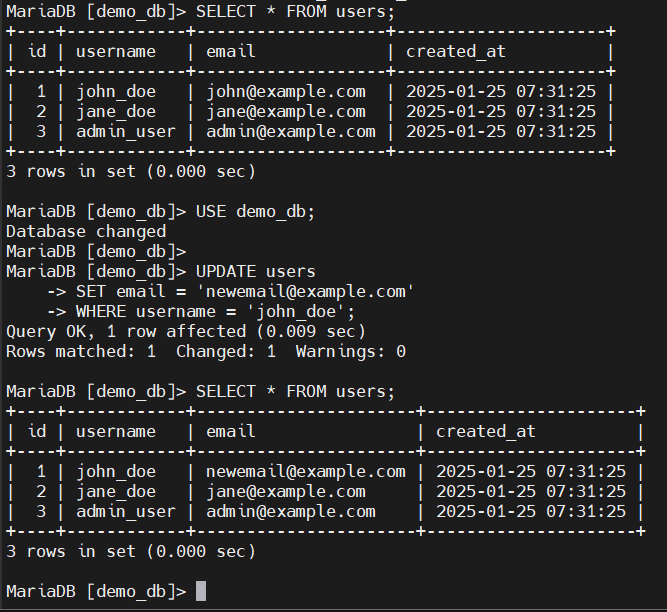
so we just update the user, awesome.
lets see if user can delete any entry.

but there is an issue, you can see roger has full access to “demo_db”. and limited access to “roger_db” table.
so we add users to roger_db then and then see if roger can delete users.
ALTER USER 'root'@'localhost' IDENTIFIED VIA mysql_native_password USING PASSWORD('your_secure_password');
FLUSH PRIVILEGES;Code language: JavaScript (javascript)Frequently Asked Questions
How do I update Ubuntu before installing MariaDB?
Before installing MariaDB, run ‘sudo apt update’ to ensure your system is up-to-date.
What command installs MariaDB on Ubuntu?
Use ‘sudo apt install mariadb-server’ to install the MariaDB server package.
How do I secure a newly installed MariaDB?
Run ‘mysql_secure_installation’ and follow the prompts for securing your installation.
Can I create multiple users with different privileges in MariaDB?
Yes, use SQL commands like CREATE USER and GRANT to define user roles and permissions.
What is the difference between MySQL and MariaDB?
MariaDB is a fork of MySQL offering additional features and performance improvements.
Be the first to comment